Posts

Showing posts with the label Windows

Manually set a certificate to archived status in Windows

Image
In this post, I describe how to manually set a certificate to the status "Archived" in Microsoft Windows. Usually, when renewing certificates, old ones get archived automatically.  However, you may want to manually set a certificate to the Archived status e.g. for testing purposes. Resolution To manually set a certificate to Archived: 1. Open a command prompt as Administrator 2. Run  certutil -store my to view the certificates in the Personal (my) store: 3. Make a note of the Cert Hash(sha1)  of the certificate you want to archive 4. Create a new file called archive.inf and insert the following text: [Properties] 19 = Empty This file is used to archive the certificate. 5. Save archive.inf e.g. to c:\ 6. In the  command prompt , change directory to where you saved archive.inf e.g. cd c:\ 7. Run  certutil -repairstore my "9a0bf9cfc3c9573121fa38fea3360ba7572a78e5" Archive.inf  replacing  9a0bf9cfc3c9573121fa38fea3360ba7572a78e5  with the Cert Ha...

Windows couldn't complete the requested changes. Error 0x800F0907

Image
 In this post, I describe how to fix the error: "Windows couldn't complete the requested changes. Because of network policy settings, Windows couldn't connect to the Internet to download files that are required to complete the requested changes. Contact your network administrator for more information. Error code: 0x800F0907" Cause This error can occur when you try to install a Windows feature e.g. .NET Extensibility 3.5 in Internet Information Services: And the policy 'Specify settings for optional component installation and component repair' has 'Never attempt to download payload from Windows Update' checked: Resolution 1 To resolve the issue, go to the policy in Computer Configuration > Administrative Templates > System, uncheck the 'Never attempt to download payload from Windows Update' checkbox. Ensure the policy is updated on the computer e.g. gpupdate. The Windows Features installer can now proceed by letting Windows Update download...

Windows sound not working - can't hear audio - can't play audio

Image
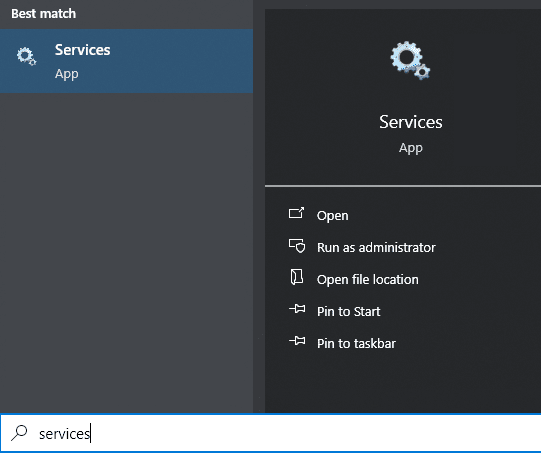
In this post, I describe two ways to fix an issue with Windows sound whereby either audio cannot be played or audio is playing but cannot be heard. Issue This issue occurs in both Windows 10 and Windows 11.  When it occurs, I either cannot play audio or, when I do play audio, the sound cannot be heard. There are two resolutions: Resolution 1 One way I have fixed this issue is by restarting the Windows Audio service: 1. Open Services (search for "services" in the Start menu) 2. Click in the right hand panel and press W to skip down to the services that start with W 3. Right click Windows Audio then select Restart My playing audio was now audible. Resolution 2 If the sound icon in the taskbar has a red cross next to it: Either follow the steps above and, if the Windows Audio service is stopped, start it Or, try right clicking the sound icon in the taskbar and selecting Troubleshoot sound problems . If the Windows Audio service won't start and Troubleshoot sound problems d...

The component store has been corrupted. Error: 0x80073712

Image
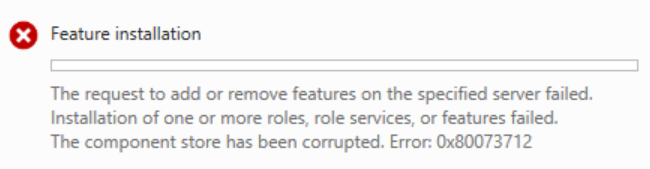
This post describes how to fix the error: "The request to add or remove features on the specified server failed. Installation of one or more roles, role services, or features failed. The component store has been corrupted. Error: 0x80073712" This error occured on Windows Server 2012 when I was trying to install DFS. Resolution To resolve the issue, I repaired the Windows Component Store by running the following in a command prompt as an administrator: Dism /Online /Cleanup-Image /RestoreHealth I was then able to successfully install the DFS feature. Edit: If the above doesn't work and you get the error: "Error: 0x800f081f The source files could not be found." Run the following to specify the source: Dism /Online /Cleanup-Image /RestoreHealth /Source:D:\sources\install.wim:4 The number at the end is the index of the Windows edition.  Run the following to see the index: Dism /Get-WimInfo /WimFile:D:\sources\install.wim If this still doesn't work, ensure the Wi...

Mouse cursor moving with arrow keys press in Windows

Image
In this post, I describe how to fix an issue in which the mouse cursor moves when the arrow keys are pressed in Windows. Cause This issue can occur when Microsoft Paint is open due to a feature in Paint which allows you to move the mouse cursor with the arrow keys e.g. so you can fine tune the exact position of the cursor. For me, the issue occurred after an automatic reboot caused by Windows Update.  I had left Paint open and it automatically reopened after the reboot.  However, the arrow key cursor move functionality was now applying everywhere, not just in Paint! Resolution To resolve the issue, I simply closed Paint.

Stop code: 0xc00002e2 - Your device ran into a problem and needs to restart - Windows server domain controller boot error

Image
 In this post, I describe how to fix the blue screen error with stop code 0xc00002e2 which can occur when booting a Windows server domain controller: Your device ran into a problem and needs to restart. We're just collecting some error info, and then we'll restart for you. Stop code: 0xc00002e2 Cause This issue can occur when booting a Windows server domain controller after a Windows update has been installed. EDIT: This issue can also occur after deleting snapshots for a virtual machine in VMware Workstation. Resolution Fortunately, this issue can be fixed so the server can be successfully booted again. To resolve the issue: 1. The server should automatically restart and take you to the  Choose an option  screen. 2. Select  Troubleshoot : 3. On the  Advanced Options  screen, select  Startup Settings . 4. Press the  Restart  button. 5. On the  Advanced Boot Options  screen, select  Directory Services Repair Mode : 6. Login...

rundll32.exe Windows cannot access the specified device, path, or file

Image
In this post, I describe how to fix the error: C:\Windows\system32\rundll32.exe Windows cannot access the specified device, path, or file. You may not have the appropriate permissions to access the item. Cause This error can occur on Windows Server 2019 when you press Desktop icon settings within Themes and related settings whilst logged in as the built-in Administrator account on a domain controller. The error occurs because of User Account Control (UAC) for the built-in Administrator account. Resolution To resolve the issue, enable the following policy: User Account Control: Admin Approval Mode for the Built-in Administrator account This is located in Windows Settings > Security Settings > Local Policies > Security Options Then restart the server. Desktop icon settings should now open as expected: Alternative Workaround An alternative way to open Desktop icon settings is to open a run prompt (Windows key + R) then type: desk.cpl ,5 Video YouTube link:  rundll32.exe Wi...

The user's account has expired - Microsoft Windows - Workgroup

Image
This post describes how to resolve the error "The user's account has expired" on a Microsoft Windows Workgroup machine i.e. without Active Directory Users and Computers. Cause This error can occur when the local user account's expiry date is in the past and you try to logon as that user. Resolution You can't use Local Users and Groups to change the user account expiry date. The expiry date can be be changed using either Powershell or VBScript. PowerShell method To get the current expiry date, run the following command in PowerShell, replacing accountname with the account you want to get. Get-LocalUser accountname|SELECT * To set the expiry date to a specified date: Set-LocalUser asmith -AccountExpires (Get-Date).AddDays(12) To set the expiry date to never expire: Set-LocalUser accountname -AccountNeverExpires VBScript method The following VBScript gets the current expiry date: Set objUser = GetObject("WinNT://hostname/accountname") Wscript.Echo objUser....

Create 7zip checksum in Windows

Image
In this post, I describe a quick way to create a checksum in Windows using the free GUI tool 7-Zip. Checksums can be used to verify the integrity of files.  It can be useful to generate them when you are sharing files with others so they can check the file they receive hasn't been tampered with or corrupted. Resolution To create a checksum in Windows: 1. Download and install the free tool 7-zip EDIT: 2. In 7-Zip v24, right click the file you want to generate a checksum for, go to 7-Zip then  CRC SHA  then  * (In earlier versions of 7-Zip, go directly to  CRC SHA then  * ) 3. After a short time, the checksum is generated: 4. You can shift select all the rows and press CTRL-C to copy the information. This post has been edited.  Thanks to the comment below for pointing out the difference in the context menu in the newer versions of 7-Zip. Related Posts - Bulk rename Windows files with touch-friendly PowerRename

Bulk rename Windows files with touch-friendly PowerRename

Image
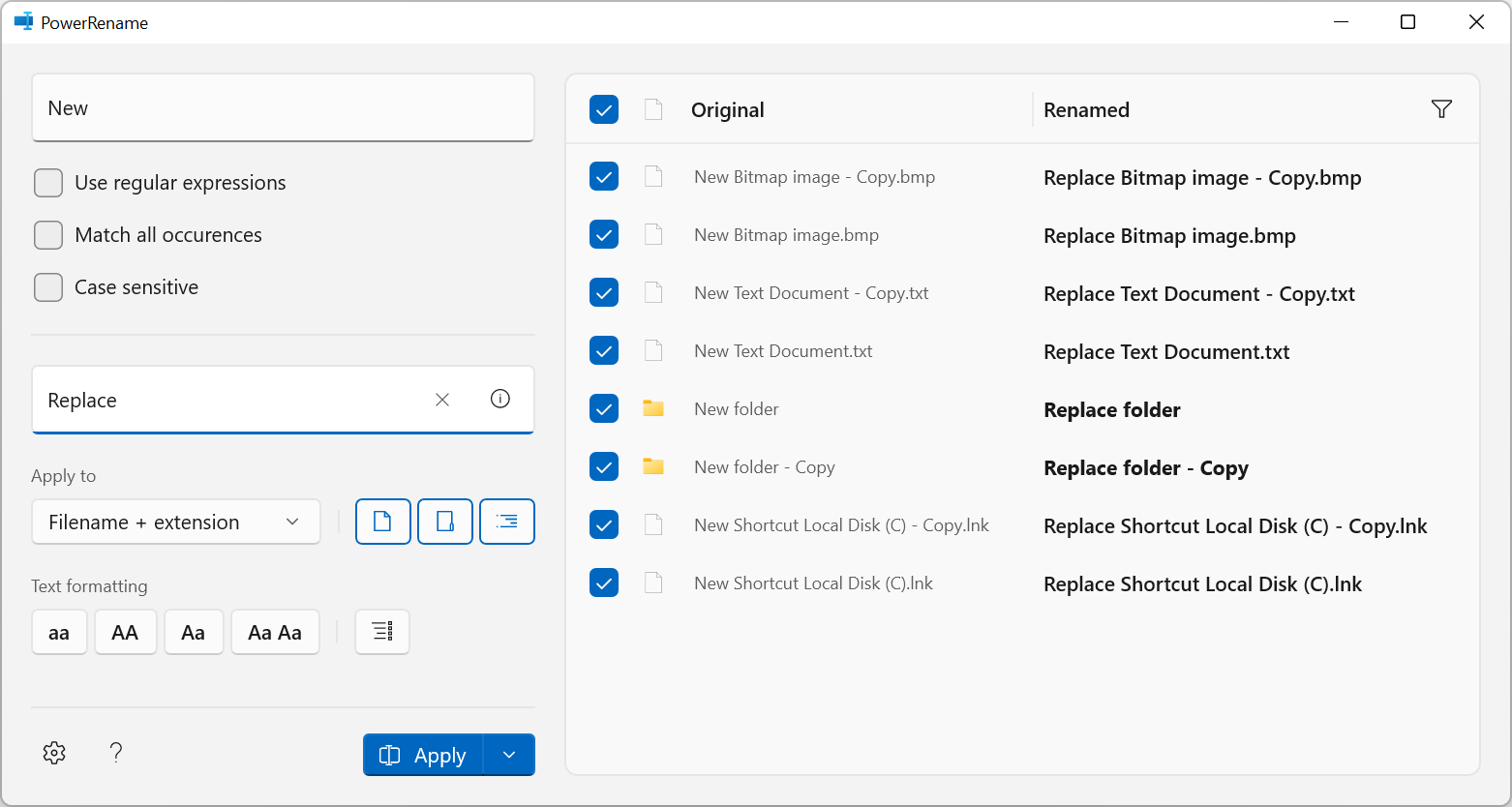
This post describes how you can rename files and folders in bulk in Windows using a tool called PowerRename which has recently been updated with a new touch-friendly interface: Resolution Firstly, you need to download and install  Microsoft PowerToys  v0.49.1 Once installed, in Windows Explorer, select all the files and folders you want to rename and right click, you should see a new option 'PowerRename' in the context menu (if you're using Windows 11, you might need to press Show More Options first): You can then type the text you want to replace in the 'Search for' textbox and the text you want to replace it with in the 'Replace with' textbox. There are various self-explanatory settings with tooltips that you can change to adjust how the text is matched and what the rename will apply to. Pressing the i button inside the 'Replace with' textbox shows some special codes that can be used to replace using file creation date and time: You can see how the...

Something happened, and we couldn't install a feature - Windows

Image
This post describes how to stop the error "Something happened, and we couldn't install a feature" which can popup in the notification action centre on Windows: Cause On my machine, this occurred when Windows tried to install the Microsoft-Windows-LanguageFeatures-Basic-en-gb-Package which failed because I have disabled the Windows Update service. I found this by searching for a CbsPackageServicingFailure2 event in the Application Log in Event Viewer. Resolution I believe this can be resolved by enabling Windows Update. Alternatively, I have tried to resolve the issue by enabling the following group policy setting: Computer Configuration\Administrative Templates\System\Specify settings for optional component installation and component repair And unchecking the 'Never attempt to download payload from Windows Update' and 'Download repair content and optional features directly from Windows Update instead of Windows Server Update Services (WSUS)' checkboxes: Pl...

The WS-Management service cannot process the request. The WMI service or the WMI provider returned an unknown error: HRESULT: 0x80070964

Image
This post describes how to fix the error: The WS-Management service cannot process the request. The WMI service or the WMI provider returned an unknown error: HRESULT: 0x80070964 This error can occur when creating a new iSCSI Virtual Disk in Server Manager on Windows. Cause This error is a 'device in use' error and can occur if you've previously tried to create an iSCSI Virtual Disk and it failed e.g. with the error  Cannot find the Windows PowerShell data file 'ImportExportIscsiTargetConfiguration.psd1' in directory 'C:\Windows\system32\WindowsPowerShell\v1.0\Modules\IscsiTarget\en-GB\', or any parent culture directories . Resolution You can delete the disk which previously failed from the list of iSCSI Virtual Disks in Server Manager (you may need to refresh first).  You can also select the option to also delete the vhdx file from the directory 'c:\iSCSIVirtualDisks'). Or you can use a different iSCSI Virtual Disk Name. The disk then successfully c...

Windows can't drag and drop - dragging files or emails not working

In this post I describe how to fix an issue in Windows where you can't drag and drop, and dragging files, folders or emails is not working.  When you drag a file and hover it over a folder, you are unable to drop it into the folder. Issue I'm not entirely sure what causes this issue.  I think Windows thinks it's still dragging something. Resolution Left click a file, keep the left click pressed, then hit the Escape key on the keyboard.

Windows Hard Drive Volume Format Partition File System exFAT Missing

Image
This post describes why the exFAT option is sometimes missing from the File system drop down when formatting a hard disk drive volume in Windows using Disk Management. Cause This issue can occur when the size of the volume you are formatting is less than 32GB, which is the maximum partition size limit using the FAT or FAT32 file system format on Windows. If you format a volume below 4GB, you will see FAT and FAT32 in the file system drop down, but not exFAT, as per the screenshot above. If you format a volume above 4GB but below 32GB, you will see FAT32 in the file system drop down, but not exFAT: Resolution If you format a volume above 32GB, you will see exFAT in the file system drop down: Alternatively, you can use format.exe in a command prompt to format the volume as exFAT.

Error 577: Windows cannot verify the digital signature for this file

Image
This post describes how to fix: Windows could not start the Windows Defender Antivirus service on Local Computer. Error 577: Windows cannot verify the digital signature for this file. A recent hardware or software change might have installed a file that is signed incorrectly or damaged, or that might be malicious software from an unknown source. Cause This error can occur when you try to start the Windows Defender Antivirus Service and Windows Defender has been turned off in group policy. Resolution Turn Windows Defender on in Group Policy.  For more information, see Related Posts. Related Posts -  Your Virus & threat protection is managed by your organization