Posts

Showing posts with the label SEO

How to use Google Trends for Google and YouTube SEO

Image
In this post, I summarise how to use Google Trends for Google and YouTube SEO.  This post summarises the Google Trends for SEO video posted by Google Search Central . Introduction Goal: Produce content inspired by search interest. SEO focusses on: Helping search engines understand your content (in-page optimization) Helping users find your site by improving your presence in search results (off-page optimization) No special secrets that will rank your site first on Google!  But there are best practices that can make it easier for search engines to crawl, index and understand your content.  The most important SEO techniques are in the SEO starter guide . SEO techniques involve: Technical or policy requirements (see Search Console Training ) Content optimization Google Trends helps SEOs: Stay up-to-date with rising topics and terms Perform keyword research Create a content calendar Plan video strategy on YouTube Staying up-to-date with rising trends One of the important as...
Reduce the impact of third-party code - Google Tag Manager - Analytics

Image
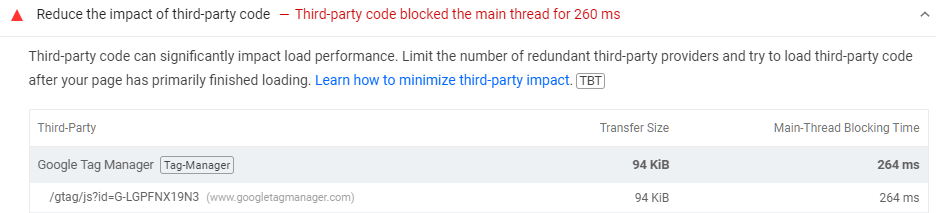
In this post, I describe how to reduce the impact of third-pary code such as Google Tag Manager (gtag) and Google Analytics. This can lead to a longer Largest Contentful Paint (LCP) which can cause Google Search Console Core Web Vitals to report "LCP issue: longer than 2.5s" and URLs as either "poor" or "need improvement". Cause The "reduce the impact of third-pary code" message can appear when you run PageSpeed Insights or Lighthouse within Google Chrome on a page which includes the Google Tag (gtag.js).  I found that my performance score would still be negatively impacted even if I used async or defer in the script tag which loaded the Google Tag. I tested removing the Google Tag completely and my score improved to 100 so I knew the Google Tag was the cause. Resolution To resolve the issue, I set a timeout then loaded the Google Tag Manager after the timeout, in this case 3,000 milliseconds later: window.setTimeout(function () { ( function (w,...

Too many characters in character literal - defer CSS - ASP.NET

Image
In this post, I describe how to defer non-critical CSS in ASP.NET without getting the error: Too many characters in character literal Cause This error can occur when you copy the suggested code from this  defer non-critical CSS page into an ASP.NET page. < link rel ="preload" href ="styles.css" as ="style" onload =" this.onload=null;this.rel='stylesheet' "> < noscript >< link rel ="stylesheet" href ="styles.css"></ noscript > Resolution I used a script tag to load the CSS instead of a link tag:      < script >         var link = document.createElement( "link" );         link.rel = "stylesheet" ;         link.href = "/css/font-awesome.css" ;         document.head.appendChild(link);     </ script > You may also wish to add a noscript tag just in case s...

IIS .webp file - add a MIME Type - HTTP error 404.3

Image
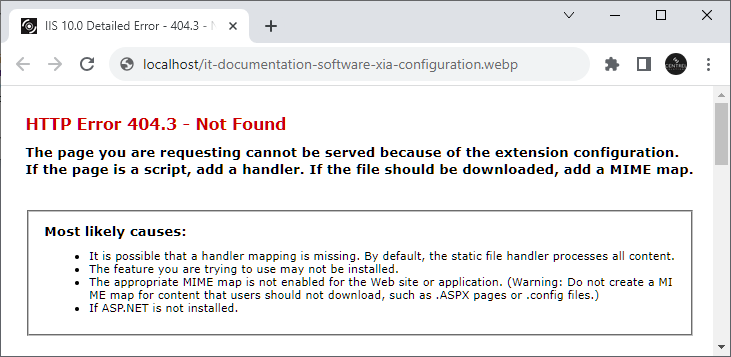
In this post, I describe how to add support for a .webp file in IIS and ASP.NET to fix the error: "HTTP Error 404.3 - Not Found The page you are requesting cannot be served because of the extension configuration. If the page is a script, add a handler. If the file should be downloaded, add a MIME map." Cause This error occurs because I'm trying to access an image in WebP format on a site in IIS or ASP.NET which does not have the .webp MIME type added. Resolution ASP.NET To resolve the error in ASP.NET, add the following to web.config:          < system.webServer >              < staticContent >                                   < mimeMap   fileExtension =".webp"   mimeType ="image/webp"   />     ...

Include & ampersand character in sitemap XML

Image
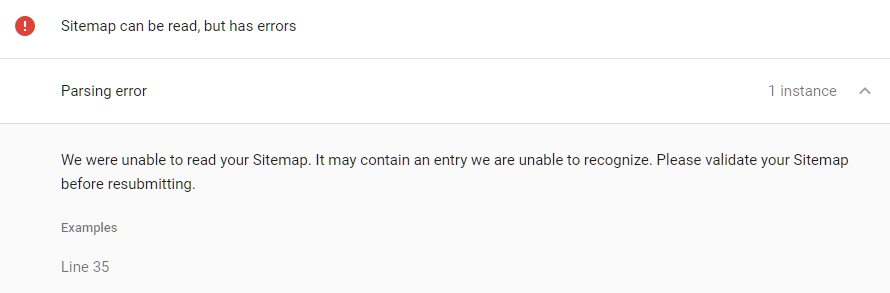
In this post, I describe how to fix a sitemap error that can occur if an unescaped character such as an & (ampersand) is included in the sitemap.xml. Cause The error occurs because the sitemap is not UTF-8 encoded.  In my case, I had a URL with an unescaped & (ampersand): <url><loc>https://www.centrel-solutions.com/company/testimonial.aspx?directory=education & testimonial=education-the-shared-learning-trust</loc><changefreq>never</changefreq></url> Resolution To resolve the error, I used an entity escape code for the & (ampersand) character as per the sitemaps specification: https://www.sitemaps.org/protocol.html <url><loc>https://www.centrel-solutions.com/company/testimonial.aspx?directory=education &amp; testimonial=education-the-shared-learning-trust</loc><changefreq>never</changefreq></url> Validate You can validate a sitemap here: https://www.xml-sitemaps.com/validate-xml-sitemap.html

Get the most from Google Analytics by using custom SEO Dashboards

Image
An excellent post on my WordPress blog which I had forgotten about.  It contains a few custom Google Analytics dashboards such as an  SEO Monitoring Dashboard .  Well worth a look if you're a website administrator with access to Analytics and a keen interest in search engine optimization.

Find the Keyword Queries leading to your Top Pages using Google Webmaster Tools

Image
Previously, I've talked about using Google Webmaster Tools to  discover relevant keywords to SEO .  An easily missed feature of Webmaster Tools is 'Pages'.  This can be accessed by clicking the Pages filter at the top of the page. The pages on your site with the most clicks from a Google search are then shown at the top of the results table. If a page has enough traffic, you can expand it to reveal the search queries used to find that page.  This also includes the Impressions, Clicks, Click Through Rate and Average Position.  This is all very useful if you're keen to find out how visitors are getting to your site when they search on Google. You might find some keywords with lots of Impressions but very few Clicks.  This could be because your page title and description aren't very compelling or it could be because your average position is low and you're not on the 1st page of Google.  You can combine this information with the  Average...

Discovering Relevant Keywords to SEO

Image
When you're using AdWords to find out average monthly searches for keywords , it can be difficult to think of all the relevant keywords for your website.  An easy way to find out this information is to use Google Webmaster Tools . Assuming you've already added your site to Webmaster Tools, login, expand 'Google Index' in the menu on the left and press 'Content Keywords'.  You can download this data as a CSV.  This can then be copied into AdWords to find out the monthly searches for all the keywords on your site.  You can then sort this data to find out which keywords are searched for most often.  Remember to use the advice I gave in this post to work out which keywords to SEO first. As well as keywords, you can also obtain search queries from Google Webmaster Tools.  To do this, expand 'Search Traffic' and press 'Search Analytics'.  This data can also be downloaded as a CSV and then copied into AdWords. This is very useful for worki...

Discovering Average Monthly Searches for Keywords

Image
Last Sunday, I posted about generic high traffic keywords vs specific low traffic keywords .  Today, I'd like to talk about how you discover the traffic for a particular keyword. Keyword traffic can be discovered using the Google AdWords Keyword Planner .  Once you've logged in, select the second option 'Get search volume for a list of keywords or group them into ad groups', type in your keyword then press the 'Get search volume' button.  The traffic is shown in the 'Avg. monthly searches' column.  Note: A hyphen indicates less than 10 and thus indicates the keyword is not very popular!

SEO - generic high traffic keywords vs specific low traffic keywords

Should you SEO generic high traffic keywords or specific low traffic keywords (aka the long tail)? Generic high traffic keywords have the potential to lead to a lot more visits to your website which raises brand awareness.  However, because the keyword is generic, the visitor is less likely to find what they are looking for and you're less likely to get a conversion.  For example, a search term of "documentation" has very high traffic but gives very little away in terms of what the visitor is actually looking for. With specific keywords, the number of potential visits is a lot less, but each visit is more likely to lead to a conversion.  For example, the search term "SQL server documentation tool" has low traffic but is more likely to lead to a sale if your website is selling such a tool.  Specific keywords are also less competitive making it easier to get a high organic ranking on search engines.  Less competition should also mean less cost per click in ad...