Posts

Showing posts with the label Website Design

link tag preload image media attribute min-width not working
Image
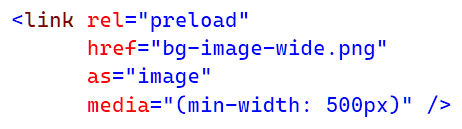
In this post, I describe how to fix an issue I had getting the link tag media attribute with min-width to work correctly. Cause Despite specifying a min-width of 500px, the link tag was still preloading the image even below a screen width of 500px.  The cause of the problem turned out to be the placement of my link tag in my HTML. Resolution The resolution turned out to be very simple.  I had inadvertently placed the link tag above my viewport meta tag: < meta name ="viewport" content ="width=device-width, initial-scale=1.0" /> To resolve the issue, I moved my link tag below my viewport meta tag:     < meta name ="viewport" content ="width=device-width, initial-scale=1.0" />         < link rel ="preload"           href ="bg-image-wide.png"           as ="image"           media ...

Realistic shadows with depth and elevation in CSS

Image
In this post, I describe how to create realistic shadows with varying depths and elevation in CSS. Low Depth Shadow in CSS Personally, I find a subtle shadow with a low depth to be a nice alternative to using a border to surround an element. This example shadow can be used to give the impression that an element is close to the page with low depth and elevation: box-shadow: rgba(0, 0, 0, 50%) 0.5px 1px 1px; Medium Depth Shadow in CSS A medium depth shadow can be useful to indicate an element has been hovered over. This example shadow can be used to give the impression that an element is further from the page with medium depth and elevation: box-shadow: rgba(0, 0, 0, 38%) 4px 8px 8px; High Depth Shadow in CSS Longer shadows with more depth and elevation can be useful for popup windows. This example shadow can be used to give the impression that an element is far from the page with high depth and elevation: box-shadow: rgba(0, 0, 0, 25%) 8px 16px 16px; Realistic Shadow in CSS To create ev...

Draggable popup window title bar header only jQuery

Image
In this post, I describe how to make a draggable popup window that can only be dragged by the title bar header, not the entire window. If you use the jQuery draggable interaction on a popup window, you will notice the entire popup window is draggable.  This may not be desirable if you have a popup window with some buttons on it as the button click doesn't work if you accidentally drag whilst you click the button. Resolution To change your popup window so that only the title bar header can be dragged, you can add the "handle" option to your script, and specify the exact element you want to be draggable e.g. here I've specified the .css-draggable-title-bar class: $( function () {     $( ".css-draggable-box" ).draggable({         handle: ".css-draggable-title-bar"     }); }); You can also specify elements that you don't want to be draggable within the handle e.g. here I've specified that elements with the ....

Textarea scrollbar change cursor pointer on hover in CSS webkit

Image
This post describes how to change the cursor on hover over a custom scrollbar in a textarea in CSS. Cause If you add a custom scrollbar to a textarea using -webkit-scrollbar e.g. /*   Set the style for a textarea scrollbar.   */ textarea::-webkit-scrollbar  {      background-color :  #f0f0f0 ;      width :  8px ; } /*   Set the style for a textarea scrollbar thumb.   */ textarea::-webkit-scrollbar-thumb  {      border-radius :  3px ;      background-color :  #c2c2c2 ; }      /*   Set the style for a textarea scrollbar thumb hover.   */      textarea::-webkit-scrollbar-thumb:hover  {          background-color :  #696969 ;     } You may notice that the cursor remains a text cursor when it's hovered over the scrollbar, even if you set cursor: default in ...

Google Chrome Developer Tools Lighthouse Audit Tips

Image
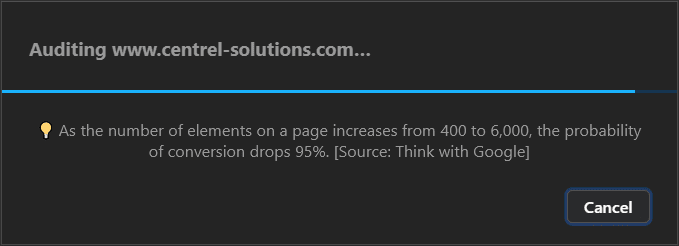
This post shows some of the tips that appear during the auditing process when generating a report using Lighthouse within Google Chrome Developer Tools. I saw these tips flash up and they sounded quite interesting but they kept disappearing when the audit finished before I had a chance to read them.  I screen grabbed a few and thought I'd share them. "As the number of elements on a page increases from 400 to 6,000, the probability of conversion drops 95%. [Source: Think with Google]" "If a site takes > 1 second to become interactive, users lose attention, and their perception of completing the page task is broken [Source: Google Developers Blog]" "70% of mobile pages take nearly 7 seconds for the visual content above the fold to display on the screen. [Source: Think with Google]" "As page load time increases from one second to seven seconds, the probability of a mobile site visitor bouncing increases 113%. [Source: Think with Google]" ...

Interactive view hide / expand collapse control in HTML without JavaScript

This post describes how to create an interactive view/hide or expand/collapse control in HTML without JavaScript. The HTML to create this control is as follows: < details >      < summary > Show details... </ summary >      < p > Here are the details! </ p > </ details > By default, this will start collapsed / hidden: Details... Here are the details! You can add the "open" attribute to start the control in a visible / expanded state: < details   open >      < summary > Show details... </ summary >      < p > Here are the details! </ p > </ details > Details... Here are the details! Related Posts -  Remove border from details summary element in CSS

Remove border from details summary element in CSS

Image
 This post describes how to remove the border from the summary element inside a details element in CSS. Create the control Create this control using the following HTML: < details >      < summary > Show more... </ summary >      < p > Here are the details. </ p > </ details > You can use this HTML to create interactive expand-and-collapse controls without any JavaScript.  Show more... Here are the details. Remove the border To remove the border, use the following CSS on the summary element details >   summary  {       outline :  none ; } Show more... Here are the details. Add a cursor pointer You can also change the cursor to a pointer to indicate to the user that they can interact with the control. details >   summary  { ...

Add GDPR Cookie Policy Consent Popup Modal Box

Image
This blog post describes how to add a GDPR cookie policy consent popup modal box to a website. Popup Modal Box I started with the popup box.  I wanted something that appeared above everything else in the bottom left.  This is easily achieved using an element such as a div and CSS such as: position: fixed; left: 20px; bottom: 20px; z-index: 999999 You may want to give it a black background with some transparency and white text: background-color: #111; opacity: 0.9; color: #fff; You may also want to add some border-radius and box-shadow. Within the box you can then add text such as "This website uses cookies" and "By continuing to browse, you are agreeing to our use of cookies as explained in our Cookie Policy ." Button At the bottom of this box, I added a Close button.  I used JavaScript to handle the OnClientClick event.  This finds the popup box by ID and hides it. function btnCloseCookiePopup_Click() {   document.getElementB...

Free live HTML authoring tool with context specific inline CSS editor

Image
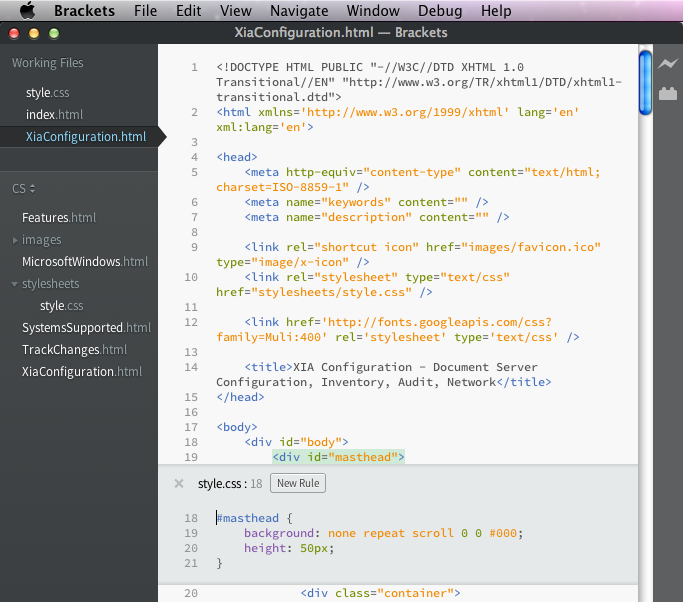
When editing HTML and CSS, normally I use Visual Studio which has great intellisense and automatic formatting.  I've been using OS X a lot recently and wanted to find a similar editor that was Mac compatible.  I was keen to find something free as my HTML authoring needs are fairly light.  I stumbled upon a great little open source editor called Brackets  by Adobe. Brackets has the usual colour coding and automatic formatting as well as intellisense.  What makes it differ from the rest is live preview capability so you can see your code changes in the browser as you type.  It also has an inline CSS editor so, at the press of a button, you can see and edit the relevant CSS rules applied to a selected HTML element (see screenshot above).  Pretty impressive for a free piece of software!