Posts

Showing posts with the label SQL Server

The client and server cannot communicate, because they do not possess a common algorithm

Image
In this post, I describe how to fix the error: "A connection was successfully established with the server, but then an error occurred during the login process. (provider: SSL Provider, error: 0 - The client and server cannot communicate, because they do not possess a common algorithm.) (.Net SqlClient Data Provider) Error Number: -2146893007" Cause This error can occur when TLS 1.0 is disabled (perhaps for security compliance purposes) and you try to connect to a version of SQL server that has not been updated to support later versions of the protocol e.g. TLS 1.1 or TLS 1.2. It can occur on SQL Server 2008, 2008 R2, 2012 and 2014. This error occurs when TLS 1.0 is disabled on the computer connecting to the SQL server.  If TLS 1.0 is disabled on the SQL Server, after a delay, a different error can occur: "The system cannot find the file specified" Resolution Ensure the SQL server is updated to support a common algorithm that is enabled i.e. TLS 1.2.  You can check w...

Gen4 family is not available in this region. Microsoft SQL Server, Error: 45122

Image
This post describes how to fix the error 'Gen4 family is not available in this region. Microsoft SQL Server, Error: 45122' Cause This error can occur when creating a new database in Azure using SQL Server Management Studio. If you select the Configure SLO page, you will see GP_Gen4_1 as the Current Service Level Objective.  This setting is greyed out if you are not signed in to Microsoft Azure: Resolution When you are signed in, these Azure options can be changed.  I changed the Edition to Basic, which also changed the Current Service Level Objective to Basic: This enabled me to successfully create the database, however this may vary depending on your region.

Document SQL Server 2019 and Azure SQL

Image
If you're looking to document SQL Server 2019 or Azure SQL then download the latest release of XIA Configuration which includes the following new functionality: SQL Server 2019 and Azure SQL XIA Configuration now supports the scanning and documenting of SQL Server 2019 and Azure SQL . Backup Exec Support for scanning and documenting Backup Exec 20.x and 21 has been added to XIA Configuration. Dynamic Scans from CSV or SQL You can now search a CSV file or SQL database for items to scan and add to XIA Configuration. Find out more about XIA Configuration Download a free 30-day trial

The EXECUTE permission was denied on the object 'sp_enlist_tsx', database 'msdb', schema 'dbo' (Error 229)

Image
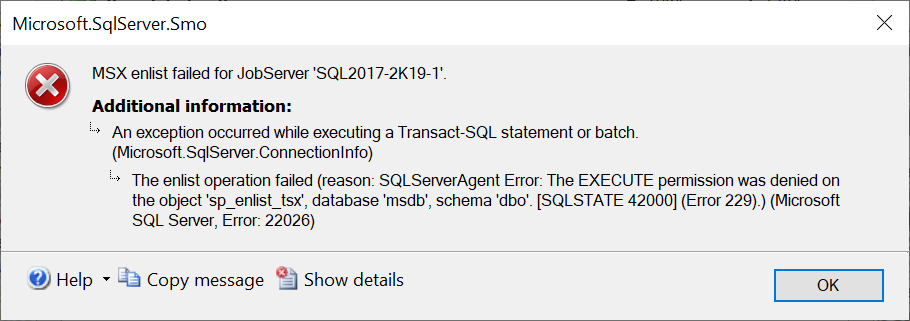
This post describes how to fix the error: MSX enlist failed for JobServer An exception occurred while executing a Transact-SQL statement or batch. The enlist operation failed (reason: SQLServerAgent Error: The EXECUTE permission was denied on the object 'sp_enlist_tsx', database 'msdb', schema 'dbo'. [SQLSTATE 42000] (Error 229).) (Microsoft SQL Server, Error: 22026) Cause This error can occur when the target server machine account does not have sufficient privileges on the master server. Resolution Check the server roles of the target server machine account on the master server. On my test environment, I resolved the issue by assigning the account the sysadmin server role: Related Posts The enlist operation failed (SQLServerAgent: Unable to connect to MSX) (Error: 22026) The target server cannot establish an encrypted connection to the master server

The target server cannot establish an encrypted connection to the master server (Error: 22026)

Image
This post describes how to fix the error: MSX enlist failed for JobServer. An exception occurred while executing a Transact-SQL statement or batch. The enlist operation failed (reason: SQLServerAgentError: The target server cannot establish an encrypted connection to the master server) (Microsoft SQL Server, Error: 22026) Cause This error can occur if the MsxEncrypyChannelOptions registry subkey is not set correctly on the target server. Resolution Go to the registry on the target server and modify the value of the registry subkey. The possible values are defined here: https://docs.microsoft.com/en-us/sql/ssms/agent/set-encryption-options-on-target-servers?view=sql-server-ver15 For my test environment, I set it to 0, which disables the encryption. Related Posts The enlist operation failed (SQLServerAgent: Unable to connect to MSX) (Error: 22026) The EXECUTE permission was denied on the object 'sp_enlist_tsx', database 'msdb',...

The enlist operation failed (SQLServerAgent: Unable to connect to MSX) (Error: 22026)

Image
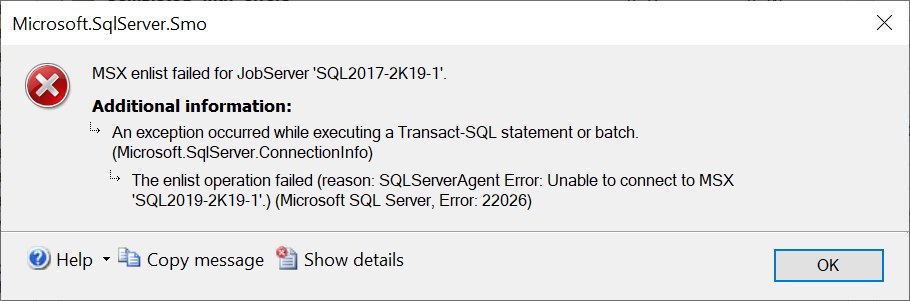
This post describes how to fix the error: MSX enlist failed for JobServer. An exception occurred while executing a Transact-SQL statement or batch. The enlist operation failed (reason SQLServerAgent Error: Unable to connect to MSX.) (Microsoft SQL Server, Error: 22026) Cause This error can occur when setting up Multi Server Administration > Make this a Master...  Check the log file on the master server (by default located here: C:\Program Files\Microsoft SQL Server\MSSQL15.MSSQLSERVER\MSSQL\Log) 2020-07-21 11:59:19.82 Logon       Login failed for user 'TEST2019\SQL2017-2K19-1$'. Reason: Could not find a login matching the name provided. [CLIENT: 192.168.131.227] The target server machine account (in this case 'TEST2019\SQL2017-2K19-1$') does not have permission to login on the master server. Resolution This error can be resolved by adding the target server machine account as a log...

Database cannot be opened. It is in the middle of a restore. (Error 927)

Image
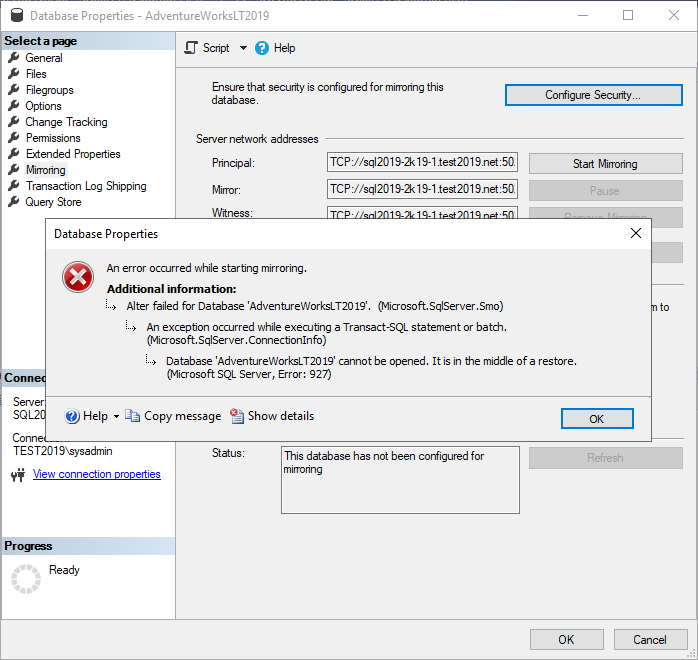
This post describes how to fix the error: Database cannot be opened. It is in the middle of a restore. (Microsoft SQL Server, Error: 927) Cause This error can occur when you try to configure mirroring using the Configure Database Mirroring Security Wizard. The endpoints are created successfully: However, when you try to Start Mirroring: The error occurs. Resolution To resolve the error, I had to start mirroring in SQL directly. I set the partner to the Principal network address on the mirror SQL instance: ALTER DATABASE AdventureWorksLT2019  SET PARTNER = 'TCP://SQL2019-2K19-1.test2019.net:5022' I then set the partner to the Mirror network address on the principal SQL instance: ALTER DATABASE   AdventureWorksLT2019   SET PARTNER = 'TCP://SQL2019-2K19-1.test2019.net:5023' And set the witness to the Witness network address on the principal SQL instance: ALTER DATABASE   AdventureWorksLT2...

The server network address can not be reached or does not exist. (Microsoft SQL Server, Error: 1418)

Image
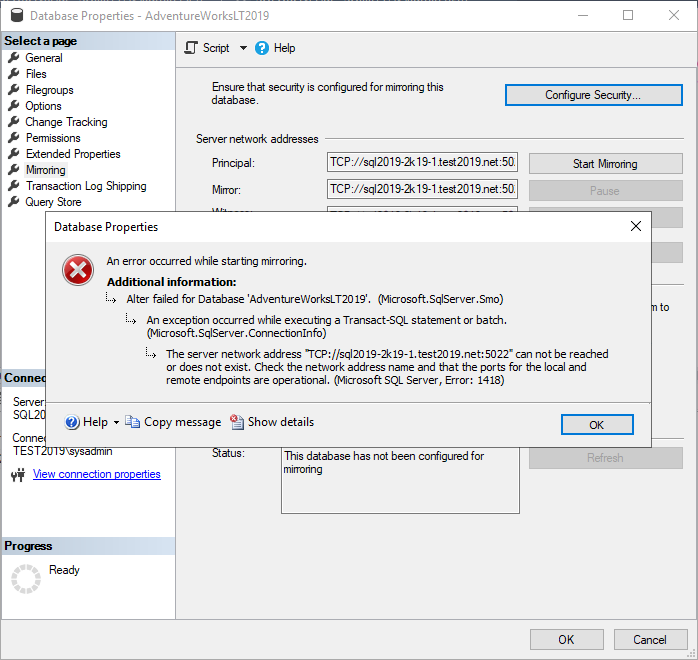
This post describes how to fix the error: An error occurred while starting mirroring. The server network address can not be reached or does not exist. (Microsoft SQL Server, Error: 1418) Cause This error appears to be related to network connectivity however the cause in this case was that I had entered incorrect accounts in the Service Accounts step of the Configure Database Mirroring Security Wizard. I verified this by checking the SQL ERRORLOG (by default located here: C:\Program Files\Microsoft SQL Server\MSSQL15.MSSQLSERVER\MSSQL\Log).  This contained the following: 2020-07-03 10:39:31.76 Logon       Database Mirroring login attempt by user 'TEST2019\SQL2019-2K19-1$.' failed with error: 'Connection handshake failed. The login 'NT Service\MSSQL$MIRRORINSTANCE' does not have CONNECT permission on the endpoint. State 84.'. Resolution To resolve the issue, first delete the previously created endpo...

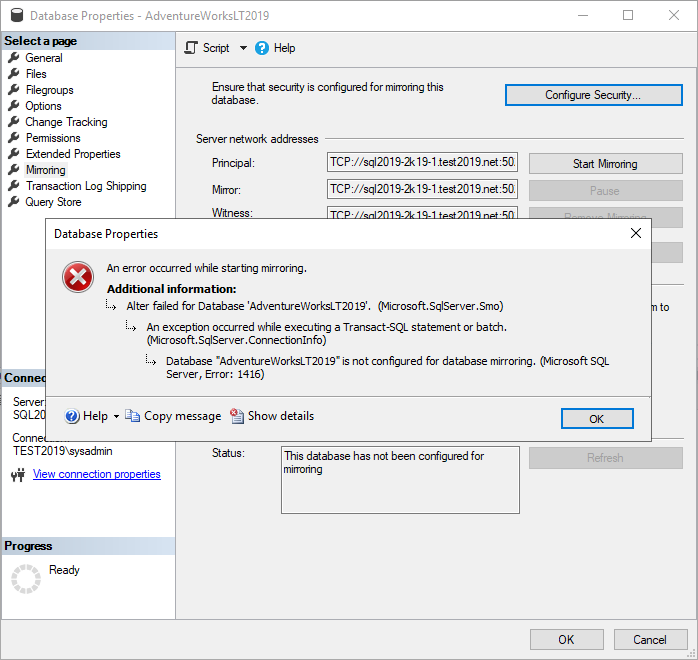
Database is not configured for database mirroring. (Microsoft SQL Server, Error: 1416)

Image
This post describes how to fix the error: An error occurred while starting mirroring. Database is not configured for database mirroring. (Microsoft SQL Server, Error: 1416) Cause This error can occur if RESTORE WITH NORECOVERY was not used when restoring either the database or the transaction log on the mirror SQL instance. Resolution When you restore the database, ensure RESTORE WITH NORECOVERY is selected: When you restore the transaction log, ensure RESTORE WITH NORECOVERY is selected: The database on the instance you want to mirror with should be in a (Restoring...) state: Related Posts - The client and server cannot communicate, because they do not possess a common algorithm -  Database cannot be opened. It is in the middle of a restore. (Error 927) -  Cannot alter the role 'db_owner', because it does not exist or you do not have permission. - The client and server cannot communicate, because they do not possess a common algorithm...

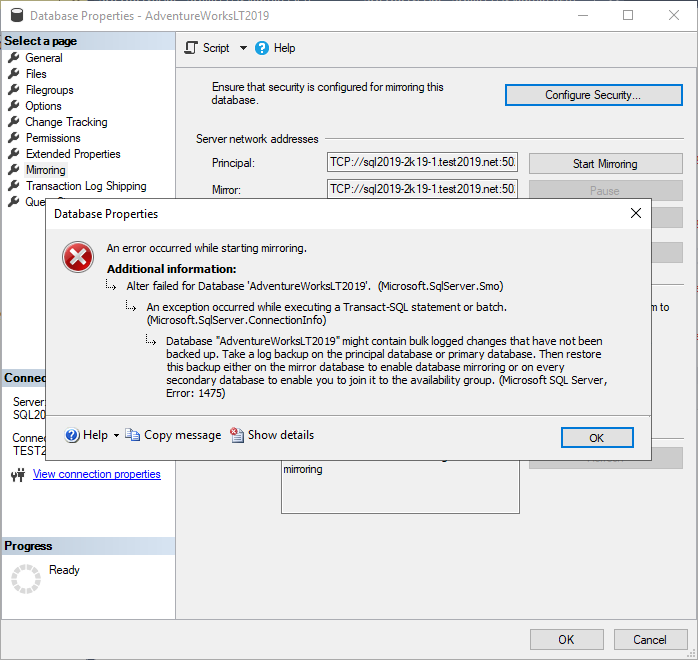
Database might contain bulk logged changes that have not been backed up (Microsoft SQL Server, Error: 1475)

Image
This post describes how to fix the error: An error occurred whilst starting mirroring. Database might contain bulk logged changes that have not been backed up. Take a log backup on the principal database or primary database. (Microsoft SQL Server, Error: 1475) Cause This error can occur when you attempt to start mirroring but the database you are trying to mirror from (the principal database) has not had a Transaction Log backup. Resolution On the database that you wish to mirror (the principal database), perform a Transaction Log backup: Then restore this backup on the mirror database, ensuring you use  RESTORE WITH NORECOVERY.  Failure to do this will result in the error: Database is not configured for database mirroring. (Microsoft SQL Server, Error: 1416)

Cannot alter the role 'db_owner', because it does not exist or you do not have permission.

Image
This post describes how to fix the error "Cannot alter the role 'db_owner', because it does not exist or you do not have permission". This also applies to the role 'db_datareader'. Cause This can occur if your server collation is case sensitive and you're trying to alter a role in SQL using the sp_addrolemember stored procedure e.g. EXEC sp_addrolemember 'db_Owner', 'dbo'; To check your server collation: SELECT SERVERPROPERTY('COLLATION'); To check your database collation: SELECT DATABASEPROPERTYEX('%DATABASENAME%', 'Collation') SQLCollation; Note: You can get a description of each COLLATION using this query: SELECT * FROM fn_helpcollations(); Solution Change your server collation or ensure the role you want to alter matches exactly including case. EXEC sp_addrolemember 'db_ o wner', 'dbo'; Video Watch the video:  Cannot alter the role, because it does not exi...

SQL Server Documentation Tool

Image
This post from MSSQLTips.com mentions a few  SQL Server Documentation Tools .  Among them is the SQL server documentation tool XIA Configuration.  The software automatically generates documentation with branding that can be modified to apply your own look and feel. Change tracking is built-in so you can view and compare the historical configuration of your servers. Reporting functionality is also included so that you can audit your environments and get the data you need to help both IT and business users. Download Free 30-Day Trial > Learn more >

SQL Server Inventory Tool

Image
If you need to create an inventory of your SQL instances then you should download and try the  SQL server inventory tool  XIA Configuration. The software audits and documents your SQL instances, databases, tables, stored procedures, security settings, connection settings and more. It can also track changes to your environment and allows you to compare versions so that you can see what has changed. This helps to expose security vulnerabilities or badly configured servers. Download Free 30-Day Trial > Learn more >