Posts

Showing posts with the label CSS

Automatically remove orphans from paragraph text blocks - CSS

Image
In this post, I describe how to use CSS to automatically remove orphans from the end of paragraphs or text blocks. An orphan is a single word that sits on its own at the bottom of a paragraph and should be avoided if possible. Resolution To automatically remove orphans using CSS, use the text-wrap property with the value pretty , e.g. p {     text-wrap : pretty ; } Orphans are now automatically removed:  This paragraph of text is long enough to wrap onto two lines and the last word is no orphan . Related Links - You can check browser support here: https://caniuse.com/?search=text-wrap%3A%20pretty

Apply a box shadow to a clip path element - CSS

Image
In this post, I describe how you can apply a box shadow (or drop shadow) to an element which also has the clip-path style. Issue If you add the box-shadow style to an element with clip-path, the shadow does not appear: You can deduce the clip-path style is the reason by toggling this style on and off. Resolution To add a drop shadow to an element which also has the clip-path style, simply wrap that element in another element: < div class ="hexagon-wrapper">     < div class ="hexagon"> Hexagon </ div > </ div > Then apply a drop-shadow filter to that parent element: .hexagon-wrapper {     filter : drop-shadow(2px 2px 3px rgba(0, 0, 0, 1)) ; } To apply multiple shadows, you can add more drop-shadow filters: .hexagon-wrapper {     filter : drop-shadow(2px 2px 3px rgba(0, 0, 0, 1)) drop-shadow(-1px 0 3px rgba(0, 0, 0, 1)) ; } Related Posts Thanks to Chris Coyier for his excellent pos...

Increase border width on hover without moving other content

Image
In this post, I describe how to increase the border thickness when you hover over an element without causing other elements on the page to move around. Cause If you add or increase the border width (top or bottom) of an element, it will increase the height of that element, which can cause other things on the page to move down. Resolution Element does not have a border If your element doesn't already have a border, you can add a transparent border, then change this to a coloured border on hover, for example: .item { border : 1px solid transparent ; }     .item:hover { border-color : red ; } Element has a border There are three ways to add a thicker border on hover if the element already has a border: 1. Reserve space in the element and expand the thicker border into that space.  For example, if you have an a element sized using line-height, you can set the min-height to a slightly bigger value to cater for the thicker border on hover: .item {     line-h...

Realistic shadows with depth and elevation in CSS

Image
In this post, I describe how to create realistic shadows with varying depths and elevation in CSS. Low Depth Shadow in CSS Personally, I find a subtle shadow with a low depth to be a nice alternative to using a border to surround an element. This example shadow can be used to give the impression that an element is close to the page with low depth and elevation: box-shadow: rgba(0, 0, 0, 50%) 0.5px 1px 1px; Medium Depth Shadow in CSS A medium depth shadow can be useful to indicate an element has been hovered over. This example shadow can be used to give the impression that an element is further from the page with medium depth and elevation: box-shadow: rgba(0, 0, 0, 38%) 4px 8px 8px; High Depth Shadow in CSS Longer shadows with more depth and elevation can be useful for popup windows. This example shadow can be used to give the impression that an element is far from the page with high depth and elevation: box-shadow: rgba(0, 0, 0, 25%) 8px 16px 16px; Realistic Shadow in CSS To create ev...

Textarea scrollbar change cursor pointer on hover in CSS webkit

Image
This post describes how to change the cursor on hover over a custom scrollbar in a textarea in CSS. Cause If you add a custom scrollbar to a textarea using -webkit-scrollbar e.g. /*   Set the style for a textarea scrollbar.   */ textarea::-webkit-scrollbar  {      background-color :  #f0f0f0 ;      width :  8px ; } /*   Set the style for a textarea scrollbar thumb.   */ textarea::-webkit-scrollbar-thumb  {      border-radius :  3px ;      background-color :  #c2c2c2 ; }      /*   Set the style for a textarea scrollbar thumb hover.   */      textarea::-webkit-scrollbar-thumb:hover  {          background-color :  #696969 ;     } You may notice that the cursor remains a text cursor when it's hovered over the scrollbar, even if you set cursor: default in ...

Remove border from details summary element in CSS

Image
 This post describes how to remove the border from the summary element inside a details element in CSS. Create the control Create this control using the following HTML: < details >      < summary > Show more... </ summary >      < p > Here are the details. </ p > </ details > You can use this HTML to create interactive expand-and-collapse controls without any JavaScript.  Show more... Here are the details. Remove the border To remove the border, use the following CSS on the summary element details >   summary  {       outline :  none ; } Show more... Here are the details. Add a cursor pointer You can also change the cursor to a pointer to indicate to the user that they can interact with the control. details >   summary  { ...

Free live HTML authoring tool with context specific inline CSS editor

Image
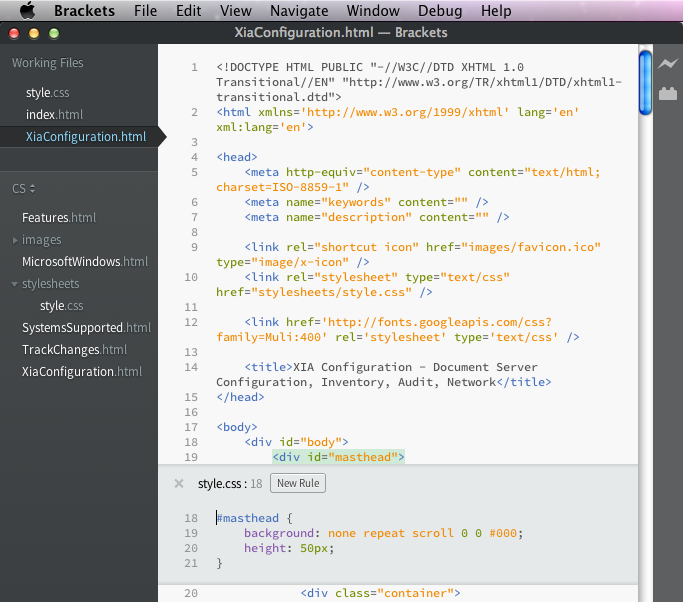
When editing HTML and CSS, normally I use Visual Studio which has great intellisense and automatic formatting.  I've been using OS X a lot recently and wanted to find a similar editor that was Mac compatible.  I was keen to find something free as my HTML authoring needs are fairly light.  I stumbled upon a great little open source editor called Brackets  by Adobe. Brackets has the usual colour coding and automatic formatting as well as intellisense.  What makes it differ from the rest is live preview capability so you can see your code changes in the browser as you type.  It also has an inline CSS editor so, at the press of a button, you can see and edit the relevant CSS rules applied to a selected HTML element (see screenshot above).  Pretty impressive for a free piece of software!