Posts

Showing posts with the label Active Directory

Insufficient access rights to perform the operation - Enable Recycle Bin - Active Directory

Image
In this post, I describe how to fix the error: Insufficient access rights to perform the operation This error can occur when you try to enable the recycle bin in Active Directory. Cause In my case, this error occurred because I was logged on as the Administrator of a child domain.  By default, the Administrator of a child domain is a member of Domain Admins but not a member of Enterprise Admins. Resolution To resolve the issue, I logged on to the parent domain and added the child domain Administrator to the Members of the Enterprise Admins group. After logging off and logging back on again to apply the group memebership, I successfully enabled the recycle bin in Active Directory.
isGlobalCatalogReady False - Global Catalog - Active Directory

Image
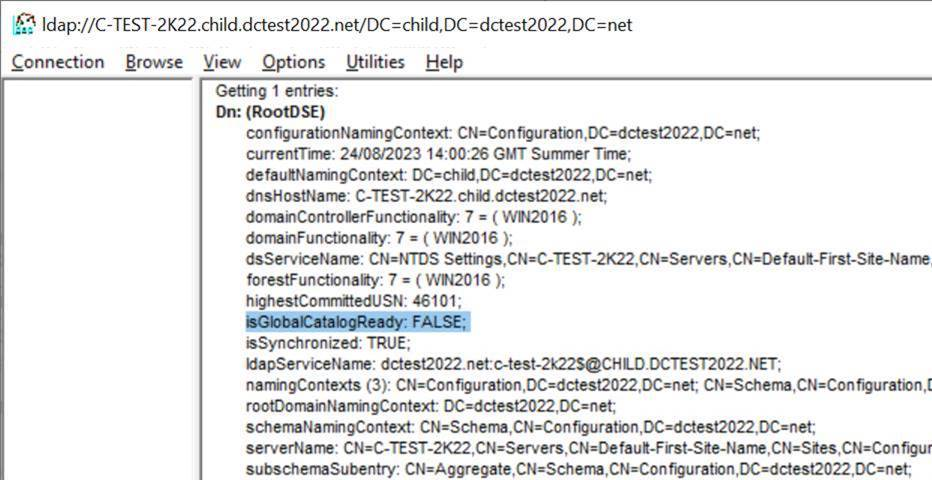
In this post, I describe how to fix the issue whereby a server that has been configured to be a Global Catlog shows  isGlobalCatalogReady:   FALSE .  You can check this in ldp.exe: The server has been configured as a Global Catalog in NTDS Settings in Active Directory Sites and Services: Cause In my case, the server was not Global Catalog ready because of a replication issue. There are several ways to diagnose this e.g. by running the following in a command prompt: - dcdiag - REPADMIN /REPLSUM - REPADMIN /SHOWREPS - REPADMIN /SHOWREPL You can also look in the Directory Services event log. The local domain controller has been selected to be a global catalog. However, the domain controller does not host a read-only replica of the following directory partition. The following error occurs when I try to replicate in Sites and Services: The DSA operation is unable to proceed because of a DNS lookup failure. Resolution To resolve the issue, I configured DNS on the serv...

FSMO role ownership could not be verified - partition not replicated

Image
In this post, I describe how to fix the error: The FSMO role ownership could not be verified because its directory partition has not replicated successfully with at least one replication partner. This error occured when I was trying to promote a server to a domain controller and add a new domain to an existing forest. Resolution To resolve the issue: 1. Open Active Directory Sites and Services 2. Navigate down to NTDS Settings  for each server, then right click <automatically generated> and press Replicate Now : 3. I was then able to successfully promote the server to a domain controller.

Enable Group Policy Regional Options Green Underline

Image
In this blog post, I describe how to enable (green underline) the Group Policy Object Regional Options.  These properties are located in: User Configuration -> Preferences -> Control Panel Settings -> Regional Options Resolution To enable (green underline) ths Regional Options, press F5 on the keyboard. Related Posts - Group Policy Documentation Tool

Active Directory Domain Controller Stop Time Syncing

Image
In this post, I describe how to stop the automatic time sync that occurs on an Active Directory Domain Controller. You may wish to disable 'Set the time automatically' if, for example, you're testing something and wish to set the time to a different time of day. Resolution To disable the automatic time sync: 1. Open regedit 2. Navigate to: HKEY_LOCAL_MACHINE\SYSTEM\CurrentControlSet\Services\W32Time\Parameters 3. Double click Type 4. Change the Value data  from NT5DS to  NoSync  and press OK

Active Directory Schema snap-in missing from MMC console

Image
In this post, I describe how to fix the Active Directory Schema snap-in missing from the MMC (Microsoft Management Console). Resolution To resolve the issue, register the Active Directory Schema snap-in by opening a command prompt and running the following: regsvr32 schmmgmt.dll The Active Directory Schema snap-in can now be added to the Microsoft Management Console (MMC):

Windows cannot delete object LDAP://... because: A referral was returned from the server.

Image
This post describes how to fix the error: Windows cannot delete object LDAP://... because: A referral was returned from the server. Cause This error occurred when I was trying to delete a domain controller using Active Directory Sites and Services.  The domain controller was part of a child domain which I had demoted. Resolution I force deleted the server using ADSIEdit: 1. Open  ADSI Edit . 2. Right click the  ADSI Edit  root node in the tree view on the left then select  Connect to... 3. In  Connection Settings , change the  Naming Context  to  Configuration  then press  OK 4. Navigate down to  CN=Servers  then right click the server you want to delete and select  Delete Related Posts - The time between replications with this source has exceeded the tombstone lifetime - The operation failed because spn value provided for addition/modification is not unique forest-wide - Error 0x2015(The directory service can pe...

Error 0x2015(The directory service can perform the requested operation only on a leaf object.)

Image
This post describes how to fix the error: “DsRemoveDsDomainW error 0x2015(The directory service can perform the requested operation only on a leaf object.)” and “ldap_delete_ext_sW error 0x42(66 (Not allowed on Non-leaf). Ldap extended error message is 00002015: UpdErr: DSID-03100E01, problem 6003 (CANT_ON_NON_LEAF), data 0 Win32 error returned is 0x2015(The directory service can perform the requested operation only on a leaf object.))” Cause There errors can occur when you use ntdsutil metadata cleanup or partition management and you try to delete domains or partitions that are not leaf objects i.e. objects that have children. They occurred for me when I was trying to delete a child domain before deleting domaindnszones. Resolution To resolve this issue, delete the child objects that are children, before attempting to delete their parents. 1. Run ntdsutil 2. Enter  partition management 3. Enter connections 4. Enter connect to server %ServerName%  (replace with your DC serve...

The operation failed because spn value provided for addition/modification is not unique forest-wide

Image
This post describes how to fix the error: The operation failed because spn value provided for addition/modification is not unique forest-wide Cause This error occurred when I demoted a child Active Directory domain controller then tried to rejoin the parent domain.  I think the parent domain still had some record of the SPN which I was not able to delete.  By default, Windows checks to ensure the SPN is unique. Resolution To resolve this issue, I disabled the uniqueness check as follows: 1. Open  ADSI Edit . 2. Right click the  ADSI Edit  root node in the tree view on the left then select  Connect to... 3. In  Connection Settings , change the  Naming Context  to  Configuration  then press  OK 4. Navigate down to  CN=Windows NT  then right click  CN=Directory Service  and select  Properties 5. Double click dSHeuristics and change the value to  000000000100000000023 to disable the UPN and SPN uniquen...

The time between replications with this source has exceeded the tombstone lifetime

Image
This post describes how to fix the error: "The directory service cannot replicate with this server because the time since the last replication with this server has exceeded the tombstone lifetime." and "It has been too long since this machine last replicated with the named source machine. The time between replications with this source has exceeded the tombstone lifetime. Replication has been stopped with this source." Cause This error can occur when trying to replicate configuration to or from the selected DC in Active Directory Sites and Services when replication has not occurred for more days than is specified in the tombstone lifetime. This error can also be seen when running DCDIAG /v /q /a from a Command Prompt. Resolution Increase Tombstone Lifetime If you are using a test environment, you may not care if replication has not occurred for a long time, so you can resolve this issue by increasing the tombstone lifetime. To do this: 1. Open ADSI Edit . 2. Right cl...

The attribute syntax specified to the directory service is invalid.

Image
This post describes how to fix the error: The attribute syntax specified to the directory service is invalid. Problem When committing the setting of an Active Directory custom attribute you get the error: System.DirectoryServices.DirectoryServicesCOMException (0x8007200B): The attribute syntax specified to the directory service is invalid. at System.DirectoryServices.DirectoryEntry.CommitChanges() Cause This error occurs when you try to set a custom attribute to a type that is invalid. For example, if you try to set an integer when the Active Directory schema is configured to accept a string. This can occur when you use XIA Automation to create or modify accounts with one or more custom attributes in Active Directory: XIA Automation screenshot showing the error The attribute syntax specified to the directory service is invalid Solution Ensure that the value type that you are trying to set matches what has been configured for that custom attribute in your Ac...

Name translation Could not find the name or insufficient right to see name

Image
This post describes how to fix the error: name translation could not find the name or insufficient right to see name (Error 0x80072116). Cause When calling the ActiveDs.NameTranslateClass.Set method, the following exception occurs if the Windows user account being used does not have permission to create or move the object to this path or if the LDAP path passed into the method is invalid:  System.ApplicationException: Could not convert the LDAP path ' LDAPPATH . Name translation: Could not find the name or insufficient right to see name . (Exception from HRESULT: 0x80072116) ---> System.Runtime.InteropServices.COMException (0x80072116): Name translation: Could not find the name or insufficient right to see name. (Exception from HRESULT: 0x80072116)   at ActiveDs.NameTranslateClass.Set(Int32 lnSetType, String bstrADsPath) XIA Automation screenshot showing error: Name translation: Could not find the name or insufficient right to see name (Exception 0x8...