Posts

Showing posts with the label HTTP Error

The request failed with HTTP status 401: Unauthorized
Image
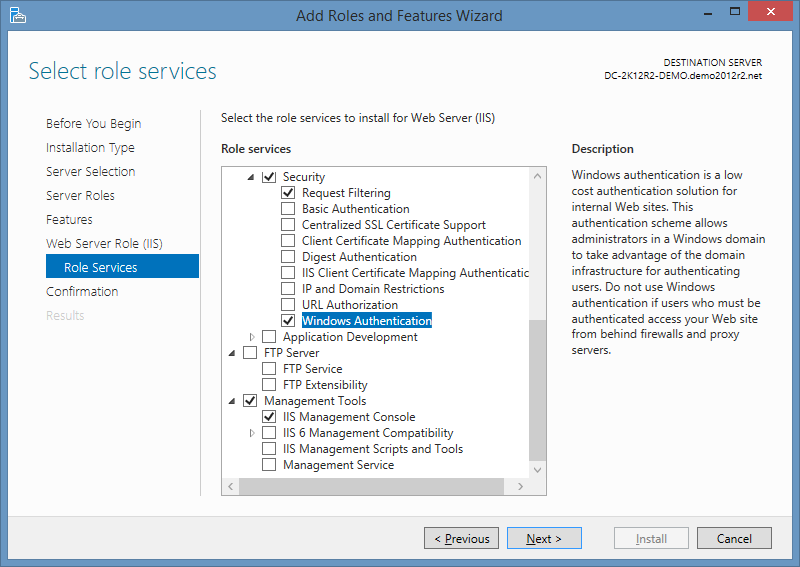
This page describes how to fix the error: Connection Failed. The request failed with HTTP status 401: Unauthorized. Cause This can occur when you try to establish a HTTP connection to an IIS server but the Windows Authentication Role Service has not bee installed. It can also occur if the IIS server requires a client certificate and this hasn't been provided by the client. Resolution Add the Windows Authentication Role Service to IIS: After Windows Authentication has installed, ensure the required Providers have been added e.g. Negotiate and NTLM.
HTTP Error 401.2 - Unauthorized IIS You are not authorized to view this page due to invalid authentication headers

Image
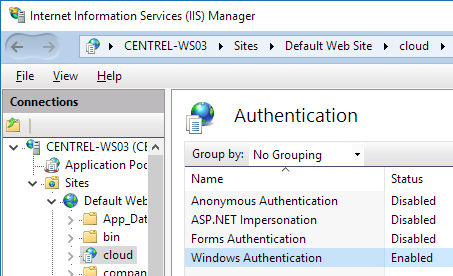
This post describes how to fix the error for web applications in IIS: HTTP Error 401.2 - Unauthorized You are not authorized to view this page due to invalid authentication headers. Cause This error can occur when you attempt to access an IIS web application and the Windows Authentication settings in IIS have been incorrectly configured. Resolution To resolve the issue, browse to the web application in IIS, go to Authentication and ensure Windows Authentication is enabled: Next, with 'Windows Authentication' selected, press 'Providers...' in the right hand Actions pane, then check that both 'Negotiate' and 'NTLM' are present:

HTTP Error 500.19 0x8007007e

Image
This post describes how to fix HTTP error 500.19 with error code 0x8007007e. Cause This error can occur in a few different situations: 1. If the ASP.NET role service has not been installed. 2. If WSUS is also installed on the same machine.  This adds an "xpress" scheme to the httpCompression section of the IIS config XML which references a suscomp.dll.  You can check this by running: %windir%\system32\inetsrv\appcmd.exe list config -section:system.webServer/httpCompression The xpress scheme looks like this: <scheme name="xpress" doStaticCompression="false" doDynamicCompression="true" dll="C:\Program Files\Update Services\WebServices\suscomp.dll" staticCompressionLevel="10" dynamicCompressionLevel="0" /> Any 32 bit applications running in IIS will try to load the suscomp.dll which is only available as 64 bit out of the box so the error above occurs. Resolution Remove the "xpress...