Posts

Textarea scrollbar change cursor pointer on hover in CSS webkit

Image
This post describes how to change the cursor on hover over a custom scrollbar in a textarea in CSS. Cause If you add a custom scrollbar to a textarea using -webkit-scrollbar e.g. /*   Set the style for a textarea scrollbar.   */ textarea::-webkit-scrollbar  {      background-color :  #f0f0f0 ;      width :  8px ; } /*   Set the style for a textarea scrollbar thumb.   */ textarea::-webkit-scrollbar-thumb  {      border-radius :  3px ;      background-color :  #c2c2c2 ; }      /*   Set the style for a textarea scrollbar thumb hover.   */      textarea::-webkit-scrollbar-thumb:hover  {          background-color :  #696969 ;     } You may notice that the cursor remains a text cursor when it's hovered over the scrollbar, even if you set cursor: default in ...

Windows can't drag and drop - dragging files or emails not working

In this post I describe how to fix an issue in Windows where you can't drag and drop, and dragging files, folders or emails is not working.  When you drag a file and hover it over a folder, you are unable to drop it into the folder. Issue I'm not entirely sure what causes this issue.  I think Windows thinks it's still dragging something. Resolution Left click a file, keep the left click pressed, then hit the Escape key on the keyboard.

Steelseries Sensei Ten squeaky scroll wheel

Image
In this post I describe how I fixed my Steelseries Sensei Ten squeaking scroll wheel. Cause This issue occurred whenever I scrolled down (towards me) with slight pressure to the left on the mouse scroll wheel. Resolution I resolved this issue by removing the pads from the bottom of the mouse to access the screws.  I then used a small Phillips head screwdriver to remove the screws.  I noticed that the bar going through the mouse wheel was just catching the bottom edge of a circuit board if I put pressure to the left on the mouse scroll wheel.  I very carefully applied a small amount of WD-40 onto the bar and the bottom of the circuit board where it was touching.  The squeaking sound on my Steelseries Sensei Ten mouse has now stopped when I scroll. Related Posts -  Light marked "W" Steelseries keyboard - what does it do

Gen4 family is not available in this region. Microsoft SQL Server, Error: 45122

Image
This post describes how to fix the error 'Gen4 family is not available in this region. Microsoft SQL Server, Error: 45122' Cause This error can occur when creating a new database in Azure using SQL Server Management Studio. If you select the Configure SLO page, you will see GP_Gen4_1 as the Current Service Level Objective.  This setting is greyed out if you are not signed in to Microsoft Azure: Resolution When you are signed in, these Azure options can be changed.  I changed the Edition to Basic, which also changed the Current Service Level Objective to Basic: This enabled me to successfully create the database, however this may vary depending on your region.

Lock Active Directory User Account - PowerShell

Image
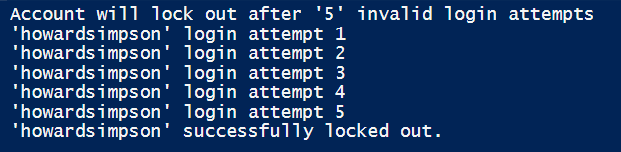
In this post, I describe how you can lock an Active Directory User Account using PowerShell. As far as I can tell, it's not possible to lock an Active Directory User Account in the Active Directory management tools UI (Active Directory Users and Computers).  However, sometimes it's necessary to lock an account, for example, if you are testing a tool which unlocks an account, such as XIA Automation . Locking an Active Directory User Account To lock an Active Directory User Account in PowerShell, we can write a simple script. Firstly, we get the account lockout threshold from group policy: $AccountLockoutThreshold = ((( [ xml ] ( Get-GPOReport -Name "Default Domain Policy" -ReportType Xml )) . GPO . Computer . ExtensionData . Extension . Account |             Where-Object name -eq LockoutBadCount ) . SettingNumber) You could also just hard code this if you know the value: $AccountLockoutThreshold = 5 Next, we need to s...

Google Chrome Developer Tools Lighthouse Audit Tips

Image
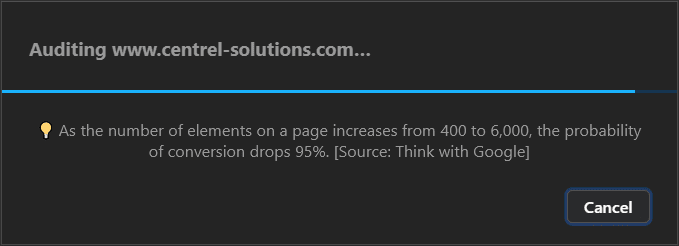
This post shows some of the tips that appear during the auditing process when generating a report using Lighthouse within Google Chrome Developer Tools. I saw these tips flash up and they sounded quite interesting but they kept disappearing when the audit finished before I had a chance to read them.  I screen grabbed a few and thought I'd share them. "As the number of elements on a page increases from 400 to 6,000, the probability of conversion drops 95%. [Source: Think with Google]" "If a site takes > 1 second to become interactive, users lose attention, and their perception of completing the page task is broken [Source: Google Developers Blog]" "70% of mobile pages take nearly 7 seconds for the visual content above the fold to display on the screen. [Source: Think with Google]" "As page load time increases from one second to seven seconds, the probability of a mobile site visitor bouncing increases 113%. [Source: Think with Google]" ...

What is the "W" light on a Steelseries keyboard?

Image
This post describes what the light marked "W" on a Steelseries Apex keyboard is. This is the fourth light in the row located in the top right corner of the keyboard, next to the Scroll Lock "S" light. The "W" light on a Steelseries Apex Keyboard This light indicates that the Windows key has been disabled.  So, when you're gaming, if you accidentally press the Windows key, you will stay in the game instead of being taken to the Windows desktop. How to turn the "W" light on or off? The "W" light on a Steelseries Apex keyboard can be turned on or off by pressing and holding the special Steelseries function key down, then pressing the Windows key. Related Posts -  Steelseries Sensei Ten squeaky scroll wheel

Audit Microsoft DNS and Windows Remote Settings

Image
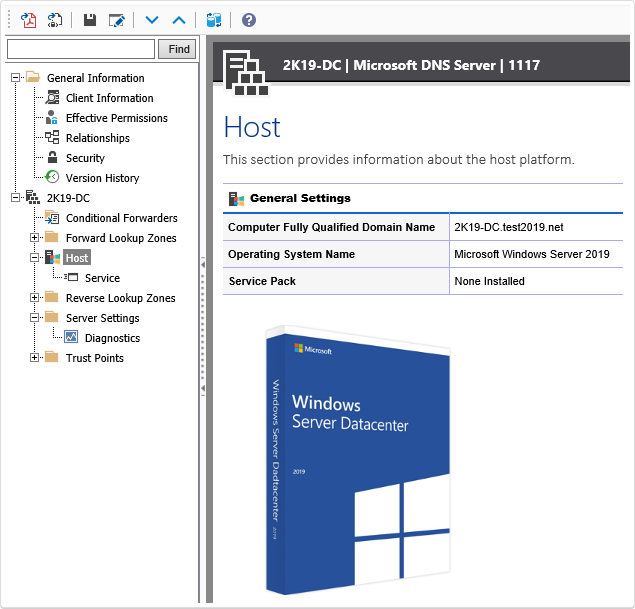
If you're looking to audit and document your Microsoft DNS and Windows remote settings then download the latest release of XIA Configuration which includes the following new functionality: Improved support for Microsoft DNS XIA Configuration's DNS support has been updated and now includes the ability to audit and document your DNS security settings . Updated Windows remote settings XIA Configuration can now document additional remote settings in Windows machines . Audit your Windows machine security XIA Configuration's Windows security compliance benchmark has also been updated and now includes the checking of WinRM and remote settings . Find out more about XIA Configuration > Download a free 30-day trial >

WARNING: Unable to resolve package source 'https://www.powershellgallery.com/api/v2'

Image
This post describes how I resolved the following: WARNING: Unable to resolve package source 'https://www.powershellgallery.com/api/v2' Cause This warning can occur when trying to install a PowerShell module and Tls12 is not specified as the SecurityProtocol. You can check the SecurityProtocol by running this command in PowerShell: [Net.ServicePointManager]::SecurityProtocol Resolution To resolve this issue, I set the SecurityProtocol to Tls12 by running this command in PowerShell: [Net.ServicePointManager]::SecurityProtocol = [Net.SecurityProtocolType]::Tls12 Source:  https://rnelson0.com/2018/05/17/powershell-in-a-post-tls1-1-world/ I was then able to install PowerShell modules successfully. Related Posts - PackageManagement\Install-Package : No match was found for the specified search criteria and module name -  Get-PSGalleryApiAvailability : PowerShell Gallery is currently unavailable. Please try again later.

How to edit and delete channels on LG smart TV

Image
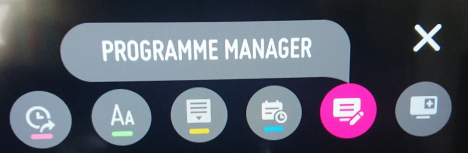
This post describes how to edit and delete channels from the TV guide for an LG smart TV. Resolution On my LG TV (webOS UK6950PLB), the steps I took to do this were: Open the LG TV guide Press the Programme Manager icon in the top right: Press Edit All Programmes On the Edit All Programmes screen, select the channels to hide on the right Press the Skip/Restore icon in the top right Select Skip from the drop down: Once a channel has been set to Skip, it no longer appears in the TV guide. Can't see Programme Manager? If your LG TV has a Channel Manager with an Edit All Channels screen, you may be able to access a Delete/Restore function.  This can be seen in the Set Up Over-the-Air Channels section of this article:  https://www.tomsguide.com/uk/us/lg-tv-settings-guide,review-4701.html Related Posts -  LG TV This app will now restart to free up more memory -  LG TV Clear All Browsing History Data -  LG TV turn off Quick Start in settings -  LG TV move or delet...

Get-WinEvent show or filter errors from event log only PowerShell

Image
This post describes how you can filter the results from the Get-WinEvent PowerShell command so only certain entry types are shown e.g. error entries only. Resolution Use -FilterHashTable and Level='2'.  You can also specify other levels to show different entry types. Get-WinEvent -MaxEvents 1 -FilterHashTable @{LogName='System';Level='2'} | Format-Table -Wrap

Get-EventLog Message truncated - Show full event log message PowerShell

Image
This post describes how to get the full event log message using the Get-EventLog PowerShell command which, by default, will truncate the message: Resolution Use Format-Table -Wrap: Get-EventLog Application -Newest 1 | Format-Table -Wrap Use -ExpandProperty: Get-EventLog Application -Newest 1 | Select -ExpandProperty Message

Windows Hard Drive Volume Format Partition File System exFAT Missing

Image
This post describes why the exFAT option is sometimes missing from the File system drop down when formatting a hard disk drive volume in Windows using Disk Management. Cause This issue can occur when the size of the volume you are formatting is less than 32GB, which is the maximum partition size limit using the FAT or FAT32 file system format on Windows. If you format a volume below 4GB, you will see FAT and FAT32 in the file system drop down, but not exFAT, as per the screenshot above. If you format a volume above 4GB but below 32GB, you will see FAT32 in the file system drop down, but not exFAT: Resolution If you format a volume above 32GB, you will see exFAT in the file system drop down: Alternatively, you can use format.exe in a command prompt to format the volume as exFAT.

PowerShell Get-Volume exFAT File System Type Unknown

Image
This post describes an alternative way to get a volume's file system type when it is formatted as exFAT and PowerShell Get-Volume returns the data as Unknown. Here is an exFAT volume in Disk Management: PowerShell Get-Volume returns FileSystemType Unknown  If I run the PowerShell command Get-Volume on Windows Server 2019 or Windows 10, the FileSystemType for the exFAT volume is returned as Unknown: Resolution To resolve the issue, you can get the data using the Win32_Volume class: Get-CimInstance Win32_Volume|SELECT DriveLetter, Label, FileSystem

Camtasia cursor effect to simulate and indicate a mouse click

Image
This post describes how to add a Camtasia cursor effect to simulate and indicate a mouse click by making the mouse size change, similar to the effect seen in the Camtasia Tutorials. The effect can easily be created by using a simple animation. 1. Change the default cursor size to 150% across the entire clip 2. Add a Custom animation where you want to indicate a mouse click.  Shorten the animation length to about 0.1 seconds. 3. Set the cursor size to 100% after the animation 4. Add a second Custom animation and place this directly after the first animation 5. Set the cursor size back to 150% after the second animation 6. Fine tune the position of the animations if required.  The middle of the animation should be lined up with where you want to simulate a mouse click. Double click To simulate a double click, simply copy and paste the two animations above and put them all next to each other. Quickly apply elsewhere Once created, you can easily use the cursor effect in other part...

Camtasia Behaviors, Cursor, Audio and Visual Effects empty with no effects showing

Image
This post describes how to fix a problem in which Camtasia Behaviors, Cursor Effects, Audio Effects and Visual Affects are empty with no effects showing: This happened after I first installed Camtasia 2020. Resolution The resolution turned out to be quite easy.  I simply closed Camtasia then re-opened it.  The Behaviors, Cursor Effects, Audio Effects and Visual Affects now appeared as expected: Related Posts -  Camtasia cursor effect to simulate and indicate a mouse click -  Open camproj file in Camtasia 2020

A file that is required cannot be installed because the cabinet file has an invalid digital signature. This may indicate that the cabinet file is corrupt.

Image
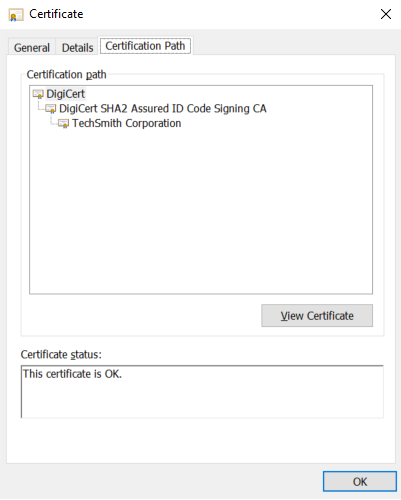
This post describes how to fix the error: A file that is required cannot be installed because the cabinet file has an invalid digital signature. This may indicate that the cabinet file is corrupt. Cause This can occur when certificates from the cabinet file's digital signature certificate trust chain are missing and cannot be validated.  This can happen when you're running an installer in an environment that's not connected to the Internet and is therefore unable to update the trusted certificate authorities automatically. Resolution Right click the cabinet file, go to the Digital Signatures tab, press Details, then View Certificate and check the Certification Path.  This shows the certificates required to complete the trust chain. Next, download and install any certificates that are missing from the trust chain. Related Posts .NET Framework has not been installed because a certificate chain could not be built to a trusted root authority An update is available that enables ...

The request failed with HTTP status 401: Unauthorized

Image
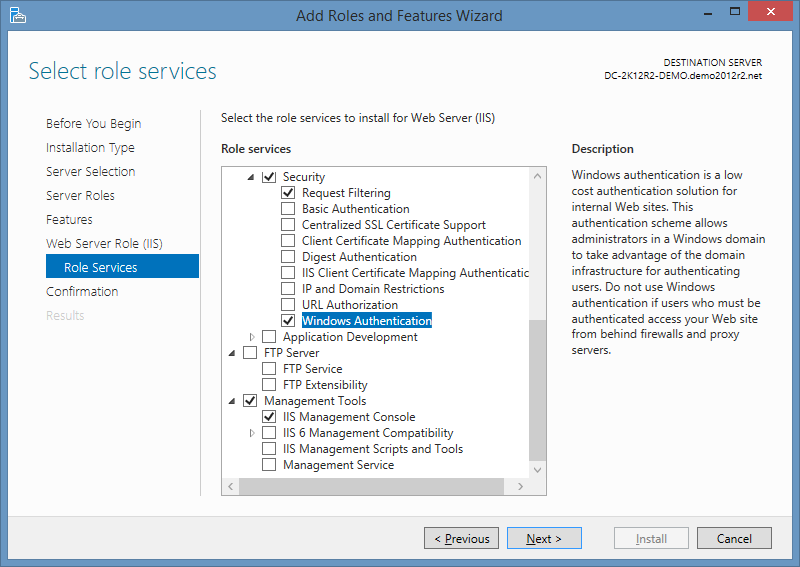
This page describes how to fix the error: Connection Failed. The request failed with HTTP status 401: Unauthorized. Cause This can occur when you try to establish a HTTP connection to an IIS server but the Windows Authentication Role Service has not bee installed. It can also occur if the IIS server requires a client certificate and this hasn't been provided by the client. Resolution Add the Windows Authentication Role Service to IIS: After Windows Authentication has installed, ensure the required Providers have been added e.g. Negotiate and NTLM.

Open camproj file in Camtasia 2020

Image
 This post describes how to open a .camproj file in Camtasia 2020. I was previously using Camtasia Studio 8, which saves projects as a .camproj file type. Camtasia 2020 saves projects as a .tscproj file type and cannot open .camproj files. Resolution Camtasia 2019 can open .camproj files and convert them to the new .tscproj format, which can then be opened in Camtasia 2020. Download Camtasia 2019 Camtasia 2019 can be downloaded here: https://www.techsmith.com/download/oldversions Open in Camtasia 2020 When you open the converted .tscproj file in Camtasia 2020, you get prompted to convert it again: You may need to fix some annotations:  For example, one of my annotations looked very squashed after the conversion: Related Posts -  Camtasia Behaviors, Cursor, Audio and Visual Effects empty with no effects showing -  Camtasia cursor effect to simulate and indicate a mouse click

The WS-Management service cannot process the request. The service is configured to not accept any remote shell requests.

Image
This post describes how to fix the error: The WS-Management service cannot process the request. The service is configured to not accept any remote shell requests. For more information, see the about_Remote_Troubleshooting Help topic. Cause This error can occur when the policy setting 'Allow Remote Shell Access' is disabled: If this policy is set to 'disabled', new remote shell connections are rejected by the server. The recommendation from Microsoft is to only disable this policy setting if you don't need PowerShell Remoting. Resolution To resolve the issue, change the 'Allow Remote Shell Access' policy setting to 'Enabled'. Video Link: The WS-Management service cannot process the request. The service is configured to not accept any remote shell requests. Related Posts -  The WinRM client cannot process the request. The authentication mechanism requested by the client is not supported...