Posts

Server Inventory Software

Image
Today I want to talk about another tutorial video from CENTREL Solutions. This video goes into more detail, specifically around using the server inventory software  XIA Configuration to create an inventory of the servers and devices on a network. The video starts in the XIA Configuration Client and shows the scan tasks typically used to retrieve inventory data. It then shows the inventory data in the XIA Configuration Server and gives an overview of the detailed information that can be viewed for each item. Finally it demonstrates the reporting feature which is used to query the entire inventory. To see all the tutorial videos, visit the Tutorials page . Interested in XIA Configuration ? Request a free trial , view pricing or download now .

Network Documentation Tool

Image
CENTREL Solutions has recently been putting together some tutorial videos to explain how to use the network documentation tool XIA Configuration. The first video gives an overview of the XIA Configuration Client which scans a network to retrieve configuration data. It then shows the XIA Configuration Server which displays this configuration data in a web interface with several different views including by organisation, by type and by report. Reports allow you to query the data and extract just the information you need. To see all the tutorial videos, visit the Tutorials page . Interested in XIA Configuration? Find out more , request a free trial , view pricing or download now .

Document Local Administrator Password Solution (LAPS) Settings

Image
New functionality has recently been added to the server documentation software XIA Configuration which allows it document  Local Administrator Password Solution (LAPS) settings. This allows you to quickly and easily check policy settings such as password length and complexity type. The Local Administrator Password Solution increases security by allowing you to set different local administrator passwords on each computer on your Active Directory domain and to change them more often.  You can also retrieve the passwords straight from Active Directory. Find out more >

The attribute syntax specified to the directory service is invalid.

Image
This post describes how to fix the error: The attribute syntax specified to the directory service is invalid. Problem When committing the setting of an Active Directory custom attribute you get the error: System.DirectoryServices.DirectoryServicesCOMException (0x8007200B): The attribute syntax specified to the directory service is invalid. at System.DirectoryServices.DirectoryEntry.CommitChanges() Cause This error occurs when you try to set a custom attribute to a type that is invalid. For example, if you try to set an integer when the Active Directory schema is configured to accept a string. This can occur when you use XIA Automation to create or modify accounts with one or more custom attributes in Active Directory: XIA Automation screenshot showing the error The attribute syntax specified to the directory service is invalid Solution Ensure that the value type that you are trying to set matches what has been configured for that custom attribute in your Ac...

Audit and Document your Windows Services Settings

Image
If you want to automatically audit and  document your Windows Services settings then check out some of the latest functionality added to the IT documentation tool XIA Configuration Server.  Retrieve settings about each Windows service including dependencies and recovery information. The full list of Windows services settings documented include: Service Name Service Display Name Description Service Account Name Service Path Service Process ID Service Start Mode (including Delayed and Trigger starts) Allow Service to Interact with Desktop Service State Recovery Options First failure action Second failure action Subsequent failure action Reset failure count Service restart delay Enable actions for stops with errors Computer restart delay Failure command  Learn more >

Document Fine-Grained Password Policies

Image
The server documentation tool XIA Configuration has recently been updated to support documenting fine-grained password policies in an Active Directory domain. Auditing fine-grained password policy configuration can help you provide information aligned to PCI DSS requirement 8.2.4 and requirement 8.2.5. The following settings are documented: Name Precedence Description Minimum Password Length Password History Password Must Meet Complexity Requirements Store Password Using Reversible Encryption Minimum Password Age Maximum Password Age Last Updated Creation Date Account Lockout Policy Account Lockout Duration Reset Failed Logon Attempts After (minutes) Applies To (accounts) Learn more >

Document Advanced Security Audit Policy Settings

Image
If you want to document your Windows Advanced Security Policy settings, take a look at the server documentation tool XIA Configuration. It has recently been updated to include information about advanced audit policy configuration . The information is gathered remotely so you don't need to install any software on each of the machines you want to document. Information from the following categories is documented by XIA Configuration: Account Logon, Account Management, Detailed Tracking, DS Access, Logon/Logoff, Object Access, Policy Change, Privilege Use and System. If you're interested, find out more about XIA Configuration  or request a free trial .

Audit Citrix server configuration and automatically create documentation

Image
Use the  Citrix XenApp documentation tool  XIA Configuration to audit your Citrix Farms and create professional documentation. It automatically scans and documents your Citrix XenApp Farms, servers, hotfixes, load balancing policies, published applications and more. The following Citrix XenApp versions are supported: Citrix XenApp 6.0, Advanced Edition Citrix XenApp 6.0, Enterprise Edition Citrix XenApp 6.0, Platinum Edition Citrix XenApp 6.5, Advanced Edition Citrix XenApp 6.5, Enterprise Edition Citrix XenApp 6.5, Platinum Edition To view the output, take a look at the Citrix documentation  example PDF.

Name translation Could not find the name or insufficient right to see name

Image
This post describes how to fix the error: name translation could not find the name or insufficient right to see name (Error 0x80072116). Cause When calling the ActiveDs.NameTranslateClass.Set method, the following exception occurs if the Windows user account being used does not have permission to create or move the object to this path or if the LDAP path passed into the method is invalid:  System.ApplicationException: Could not convert the LDAP path ' LDAPPATH . Name translation: Could not find the name or insufficient right to see name . (Exception from HRESULT: 0x80072116) ---> System.Runtime.InteropServices.COMException (0x80072116): Name translation: Could not find the name or insufficient right to see name. (Exception from HRESULT: 0x80072116)   at ActiveDs.NameTranslateClass.Set(Int32 lnSetType, String bstrADsPath) XIA Automation screenshot showing error: Name translation: Could not find the name or insufficient right to see name (Exception 0x8...

Active Directory Documentation Tool & Auditing Software

Image
Use the Active Directory documentation tool XIA Configuration to automatically document your Active Directory domain and Group Policy settings. Below is a screenshot of the XIA Configuration web interface showing an Active Directory item: The software includes version control so you can track changes and custom branding so you can apply your own look and feel. Download Free 30-Day Trial > Learn more >

'There is no attribute "allowfullscreen"' iFrame embedded YouTube videos

Image
Problem You've embedded a video from YouTube into your HTML using their embed code e.g. <iframe width="560" height="315" src="https://www.youtube.com/embed/dNVpL2-8-BU" frameborder="0" allowfullscreen></iframe> You then validate your HTML and get the error: there is no attribute "allowfullscreen" Cause As stated by the w3c validation tool , one of the likely causes is that you're using a document type that does not support the "allowfullscreen" attribute for this element. The w3c validation tool tells you which document type you're using: In this case, we're using XHTML 1.0 Transitional which does not support allowfullscreen. Solution 1 HTML5 does support the allowfullscreen attribute on the iFrame element so changing the doctype to HTML5 will fix this issue.  You can try this from the w3c validation tool by changing the drop down just to the right of doctype from (dete...

Document Citrix XenDesktop

Image
If you're looking for a tool that can automatically create Citrix XenDesktop documentation for your environment then you should take a look at the Citrix XenDesktop capability for XIA Configuration Server . It generates documentation for published applications, machine catalogs, delivery groups, machines, delivery groups and more, all within a single unified user interface. The following Citrix XenDesktop versions are supported: Citrix XenDesktop / XenApp 7.0, Any Edition Citrix XenDesktop / XenApp 7.1, Any Edition Citrix XenDesktop / XenApp 7.5, Any Edition Citrix XenDesktop / XenApp 7.6, Any Edition Citrix XenDesktop / XenApp 7.7, Any Edition Citrix XenDesktop / XenApp 7.8, Any Edition Citrix XenDesktop / XenApp 7.9, Any Edition To see the output, check out the sample Citrix XenDesktop report . - Please visit the Citrix XenDesktop capability page for more information. - A free trial version is available.

Remove a hard drive from 2014/2015 Sky box

Image
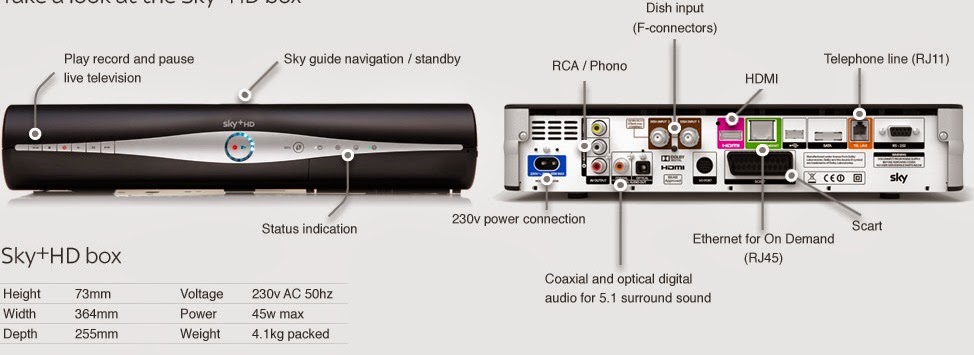
This post describes how to remove the hard drive from a new Sky+ HD box (2014/2015). It turned out to be trickier than I expected and I couldn't find much on the Internet to help so thought I'd write a quick post. Firstly, you need to remove the two grey plastic panels on the sides.  This is done by removing the two screws on the far left and right at the back.  Once these screws are removed, if you look under the box, you can see a piece of black plastic that can be lifted and a triangle shaped gap:  So, whilst lifting the black plastic with your finger, put a flathead screwdriver into the triangle shaped gap and lever the grey plastic backwards so it slides out. Next, you need to remove the black plastic casing.  To do this, remove the two screws in the deep black holes on the bottom of the box (near the piece of black plastic that can be lifted).  Once these are out, locate another piece of black plastic that can be lifted on the botto...

Free live HTML authoring tool with context specific inline CSS editor

Image
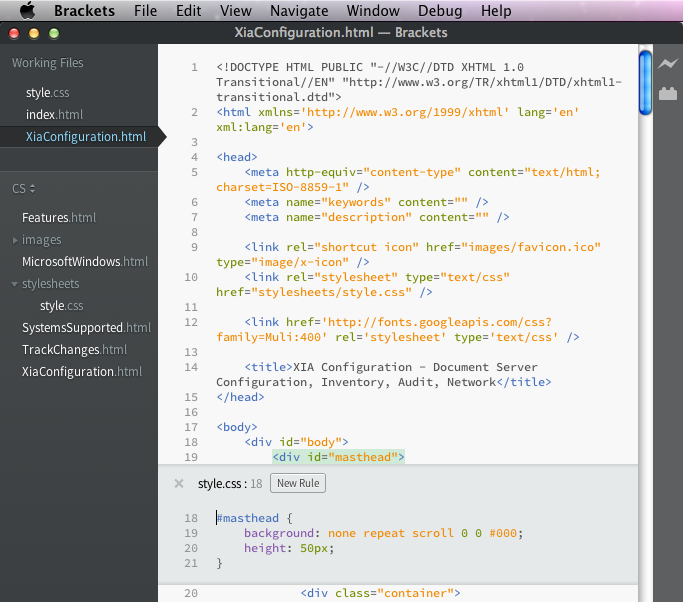
When editing HTML and CSS, normally I use Visual Studio which has great intellisense and automatic formatting.  I've been using OS X a lot recently and wanted to find a similar editor that was Mac compatible.  I was keen to find something free as my HTML authoring needs are fairly light.  I stumbled upon a great little open source editor called Brackets  by Adobe. Brackets has the usual colour coding and automatic formatting as well as intellisense.  What makes it differ from the rest is live preview capability so you can see your code changes in the browser as you type.  It also has an inline CSS editor so, at the press of a button, you can see and edit the relevant CSS rules applied to a selected HTML element (see screenshot above).  Pretty impressive for a free piece of software!

The Goal by Eliyahu Goldratt

Image
I recently finished reading The Goal by Eliyahu Goldratt. It's an excellent book for anyone looking to change the way they think about work. In a nutshell, it states that the goal of a business is to make money and that, in order to achieve this goal, you need to increase throughput of sales, reduce operational expense and reduce inventory. Throughput of sales is the rate at which money is generated through sales (i.e. the money coming in). Inventory is the money that has been invested in purchasing things which are intended to be sold (i.e. the money invested). Operational expense is the money that is spent in order to turn inventory into sales (i.e. the money going out). The key to reducing inventory and increasing throughput of sales is not to look at each local area and optimize but instead to look at the entire system. Start by identifying the Bottlenecks (resources whose capacity is equal to or less than the demand placed on them) and non-bottlenecks (resour...

Get the most from Google Analytics by using custom SEO Dashboards

Image
An excellent post on my WordPress blog which I had forgotten about.  It contains a few custom Google Analytics dashboards such as an  SEO Monitoring Dashboard .  Well worth a look if you're a website administrator with access to Analytics and a keen interest in search engine optimization.

Errors 0x8007000D and 0x80070032

In this post, I describe the symptoms, possible causes and resolutions to 0x8007000D and 0x80070032. When a Microsoft IIS scan performed by XIA Configuration fails with the error "Could not obtain the IIS 7 Configuration Section 'sectionname'" and the COMException code returned is 0x8007000D, the cause could be: 1. 0x8007000D Services configured within the Web.config file that are not available or installed on IIS.  To fix this, modify the web.config file so it only includes valid directives for services that are installed on IIS. 2. 0x80070032 The web.config of the specified web directory is configured with a serviceModel directive however the required server role is not installed.  To fix this, determine if the serviceModel directive is required in the web.config. If it is not required, it should be removed from the web.config file.  If the serviceModel directive is required, the appropriate .NET services should be installed.

Gaming PC With a Stunning Futuristic Modular Design

Image
Engadget award winner for best pc at CES 2014, this is Razer's project Christine.  As you can see, it has a stunning modular design, which makes replacing parts as simple as inserting them into one of the many expansion bays. This redefines the meaning of plug-and-play!  I love the control panel display on the front. Check out the video here:

Find the Keyword Queries leading to your Top Pages using Google Webmaster Tools

Image
Previously, I've talked about using Google Webmaster Tools to  discover relevant keywords to SEO .  An easily missed feature of Webmaster Tools is 'Pages'.  This can be accessed by clicking the Pages filter at the top of the page. The pages on your site with the most clicks from a Google search are then shown at the top of the results table. If a page has enough traffic, you can expand it to reveal the search queries used to find that page.  This also includes the Impressions, Clicks, Click Through Rate and Average Position.  This is all very useful if you're keen to find out how visitors are getting to your site when they search on Google. You might find some keywords with lots of Impressions but very few Clicks.  This could be because your page title and description aren't very compelling or it could be because your average position is low and you're not on the 1st page of Google.  You can combine this information with the  Average...

Discovering Relevant Keywords to SEO

Image
When you're using AdWords to find out average monthly searches for keywords , it can be difficult to think of all the relevant keywords for your website.  An easy way to find out this information is to use Google Webmaster Tools . Assuming you've already added your site to Webmaster Tools, login, expand 'Google Index' in the menu on the left and press 'Content Keywords'.  You can download this data as a CSV.  This can then be copied into AdWords to find out the monthly searches for all the keywords on your site.  You can then sort this data to find out which keywords are searched for most often.  Remember to use the advice I gave in this post to work out which keywords to SEO first. As well as keywords, you can also obtain search queries from Google Webmaster Tools.  To do this, expand 'Search Traffic' and press 'Search Analytics'.  This data can also be downloaded as a CSV and then copied into AdWords. This is very useful for worki...