Posts

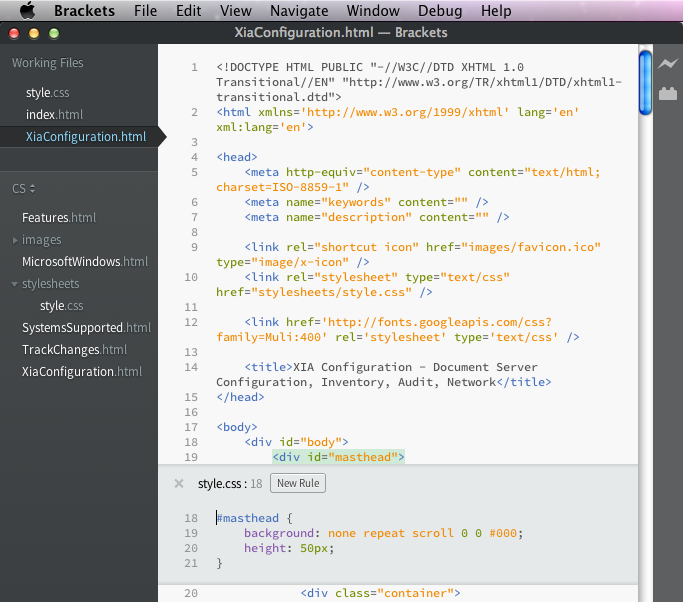
Free live HTML authoring tool with context specific inline CSS editor
Image
When editing HTML and CSS, normally I use Visual Studio which has great intellisense and automatic formatting.  I've been using OS X a lot recently and wanted to find a similar editor that was Mac compatible.  I was keen to find something free as my HTML authoring needs are fairly light.  I stumbled upon a great little open source editor called Brackets  by Adobe. Brackets has the usual colour coding and automatic formatting as well as intellisense.  What makes it differ from the rest is live preview capability so you can see your code changes in the browser as you type.  It also has an inline CSS editor so, at the press of a button, you can see and edit the relevant CSS rules applied to a selected HTML element (see screenshot above).  Pretty impressive for a free piece of software!

The Goal by Eliyahu Goldratt

Image
I recently finished reading The Goal by Eliyahu Goldratt. It's an excellent book for anyone looking to change the way they think about work. In a nutshell, it states that the goal of a business is to make money and that, in order to achieve this goal, you need to increase throughput of sales, reduce operational expense and reduce inventory. Throughput of sales is the rate at which money is generated through sales (i.e. the money coming in). Inventory is the money that has been invested in purchasing things which are intended to be sold (i.e. the money invested). Operational expense is the money that is spent in order to turn inventory into sales (i.e. the money going out). The key to reducing inventory and increasing throughput of sales is not to look at each local area and optimize but instead to look at the entire system. Start by identifying the Bottlenecks (resources whose capacity is equal to or less than the demand placed on them) and non-bottlenecks (resour...

Get the most from Google Analytics by using custom SEO Dashboards

Image
An excellent post on my WordPress blog which I had forgotten about.  It contains a few custom Google Analytics dashboards such as an  SEO Monitoring Dashboard .  Well worth a look if you're a website administrator with access to Analytics and a keen interest in search engine optimization.

Errors 0x8007000D and 0x80070032

In this post, I describe the symptoms, possible causes and resolutions to 0x8007000D and 0x80070032. When a Microsoft IIS scan performed by XIA Configuration fails with the error "Could not obtain the IIS 7 Configuration Section 'sectionname'" and the COMException code returned is 0x8007000D, the cause could be: 1. 0x8007000D Services configured within the Web.config file that are not available or installed on IIS.  To fix this, modify the web.config file so it only includes valid directives for services that are installed on IIS. 2. 0x80070032 The web.config of the specified web directory is configured with a serviceModel directive however the required server role is not installed.  To fix this, determine if the serviceModel directive is required in the web.config. If it is not required, it should be removed from the web.config file.  If the serviceModel directive is required, the appropriate .NET services should be installed.

Gaming PC With a Stunning Futuristic Modular Design

Image
Engadget award winner for best pc at CES 2014, this is Razer's project Christine.  As you can see, it has a stunning modular design, which makes replacing parts as simple as inserting them into one of the many expansion bays. This redefines the meaning of plug-and-play!  I love the control panel display on the front. Check out the video here:

Find the Keyword Queries leading to your Top Pages using Google Webmaster Tools

Image
Previously, I've talked about using Google Webmaster Tools to  discover relevant keywords to SEO .  An easily missed feature of Webmaster Tools is 'Pages'.  This can be accessed by clicking the Pages filter at the top of the page. The pages on your site with the most clicks from a Google search are then shown at the top of the results table. If a page has enough traffic, you can expand it to reveal the search queries used to find that page.  This also includes the Impressions, Clicks, Click Through Rate and Average Position.  This is all very useful if you're keen to find out how visitors are getting to your site when they search on Google. You might find some keywords with lots of Impressions but very few Clicks.  This could be because your page title and description aren't very compelling or it could be because your average position is low and you're not on the 1st page of Google.  You can combine this information with the  Average...

Discovering Relevant Keywords to SEO

Image
When you're using AdWords to find out average monthly searches for keywords , it can be difficult to think of all the relevant keywords for your website.  An easy way to find out this information is to use Google Webmaster Tools . Assuming you've already added your site to Webmaster Tools, login, expand 'Google Index' in the menu on the left and press 'Content Keywords'.  You can download this data as a CSV.  This can then be copied into AdWords to find out the monthly searches for all the keywords on your site.  You can then sort this data to find out which keywords are searched for most often.  Remember to use the advice I gave in this post to work out which keywords to SEO first. As well as keywords, you can also obtain search queries from Google Webmaster Tools.  To do this, expand 'Search Traffic' and press 'Search Analytics'.  This data can also be downloaded as a CSV and then copied into AdWords. This is very useful for worki...

SQL Server Documentation Tool

Image
This post from MSSQLTips.com mentions a few  SQL Server Documentation Tools .  Among them is the SQL server documentation tool XIA Configuration.  The software automatically generates documentation with branding that can be modified to apply your own look and feel. Change tracking is built-in so you can view and compare the historical configuration of your servers. Reporting functionality is also included so that you can audit your environments and get the data you need to help both IT and business users. Download Free 30-Day Trial > Learn more >

Discovering Average Monthly Searches for Keywords

Image
Last Sunday, I posted about generic high traffic keywords vs specific low traffic keywords .  Today, I'd like to talk about how you discover the traffic for a particular keyword. Keyword traffic can be discovered using the Google AdWords Keyword Planner .  Once you've logged in, select the second option 'Get search volume for a list of keywords or group them into ad groups', type in your keyword then press the 'Get search volume' button.  The traffic is shown in the 'Avg. monthly searches' column.  Note: A hyphen indicates less than 10 and thus indicates the keyword is not very popular!

SEO - generic high traffic keywords vs specific low traffic keywords

Should you SEO generic high traffic keywords or specific low traffic keywords (aka the long tail)? Generic high traffic keywords have the potential to lead to a lot more visits to your website which raises brand awareness.  However, because the keyword is generic, the visitor is less likely to find what they are looking for and you're less likely to get a conversion.  For example, a search term of "documentation" has very high traffic but gives very little away in terms of what the visitor is actually looking for. With specific keywords, the number of potential visits is a lot less, but each visit is more likely to lead to a conversion.  For example, the search term "SQL server documentation tool" has low traffic but is more likely to lead to a sale if your website is selling such a tool.  Specific keywords are also less competitive making it easier to get a high organic ranking on search engines.  Less competition should also mean less cost per click in ad...

Network Reporting Tool & Auditing Software

Image
XIA Configuration Server is a network reporting tool that helps administrators analyse their server and network infrastructure. It includes over 90 preconfigured reports to help you extract the data you need from your environment.  These reports can be customised directly using SQL maximising flexibility and allowing bespoke requirements to be met easily. With XIA Configuration Server, network administrators can include images of their assets and the Hardware Definition system into these reports.  The output can be PDF, CSV or web based. Here are some of the preconfigured reports included with XIA Configuration Server: Active Directory (FSMO) Role Holders Active Directory Sites and Servers Active Directory Summary Report All Cluster Nodes All Exchange Servers All Windows Desktops All Windows Laptops Archive Data Breakdown Archive Data Information Archive Table Information Cluster Resource Types Cluster Summary Report Connection (Session) Broker Summary Con...

Automatically Manage Users, Groups and OUs in Active Directory

Image
Are you looking for an Active Directory management tool to help manage your AD? XIA Automation Server saves you time by automating tasks that would take a lot longer to perform manually. For example, you can import users into Active Directory from CSV in bulk , creating your entire AD structure and provisioning thousands of users, groups and directories in minutes. Routine tasks can be delegated to non-administrators and are all performed through an intuitive web interface on either a desktop or mobile device. XIA Automation Server can also be used to create and manage your Microsoft Exchange mailboxes, Windows network shares and to delegate Active Directory password resets. Learn more about XIA Automation Server >

Desktop Application Launcher - XIA Links

Image
XIA Links Server is a Windows Desktop Application Launcher .  It empowers users on your network to launch programs through a convenient, easy to use interface.  Network administrators can manage which applications are displayed to end users on all the workstations on their network at once. Applications can be grouped into categories making them easy to find on workstations with a large number of different programs.  XIA Links Server organises shortcuts to applications into a single location so they can easily be found and launched by users. Learn more about XIA Links Server >

Hyper-V Documentation Video

Image
David Homer has released a video showing how to automate  Hyper-V Documentation  using a software tool called XIA Configuration.

Audit NTFS Permissions

Image
An excellent post from David Homer's blog detailing how you can Audit NTFS permissions  with version 5 of a tool called XIA Configuration Server. To find out more about XIA Configuration Server, click here .

DHCP Reporting Tool - Auditing Software

Image
A quick and easy way to document your DHCP server configuration is to use a tool called XIA Configuration.  It automatically gathers information about: server configuration classes scopes reservations exclusions server options dynamic DNS settings XIA Configuration automatically detects DHCP server relationships including the host machine and IPv4 and IPv6 scopes. All of XIA Configuration's features are supported when documenting DHCP configuration.  This includes version control, production of professional PDF reports, change tracking and XML output. Find out more here:  DHCP Reporting Tool Download Free 30-Day Trial >

Windows Server Security Audit Tool

Image
Perform a detailed security audit of your Windows servers and workstations with the  Windows server security audit tool  XIA Configuration. Version 4.2 includes: Improved documentation of local user accounts  Local Security Options  Local account lockout policies  Local password policies  Continued support for user rights assignment  This functionality can be used to: Define servers that do not meet the security requirements of the organisation  Detect changes to the security configuration of remote machines  Determine where a server's administrator account or administrators group has been renamed  Learn more >

XIA Configuration Server 4.2 released

Image
XIA Configuration Server is a  network documentation tool  which creates a detailed inventory of all the systems on your network. Version 4.2 is now available to download.  This release includes: Microsoft DHCP audit and documentation tool .  Scan your DHCP servers including the DHCP server itself as well as scopes, exclusions, classes and scopes. Unix and Linux server documentation tool .  Scan your Unix and Linux servers including Solaris and HPUX.  Locate incorrectly configured network settings and track changes to configuration files. Mobile support so you can view your configuration data when you're away from the office with either an iPhone or Android device. As well as the new features listed above, XIA Configuration Server can also be used as a SQL server documentation tool  and as an Active Directory documentation tool .

Document Remote Desktop Configuration

Image
If you want to document your  Remote Desktop configuration , you can do it automatically with the  network documentation tool  XIA Configuration. It includes both the remote desktop and remote assistance settings on Windows PCs and Windows Servers. This is important when documenting an environment as it effects the security of a network and the ability to support managed users. The following settings are documented: Allow Remote Control  Ticket Expiry  Ticket Encryption  License Mode  Full Terminal Server  Remote Desktop Users  Remote Assistance Enabled - Find out more about XIA Configuration > - Request a Free Trial >

Extend Configuration Types with a software tool called XIA Configuration

Image
XIA Configuration's CMDB extensibility with custom attributes design goal is to automatically obtain as much configuration information as possible. However, it is not always possible to obtain all the information desired programmatically, for example, Contact details, Security access details for a building or data room and ISP details including ISP name and connection type. XIA Configuration handles this by allowing users to extend any of the configuration types with custom sections and attributes. This custom information is seamlessly integrated with the existing user interface and PDF report exports. Information that can be input into these custom sections can be constrained with mandatory fields, drop down lists and regular expressions. Find out more about XIA Configuration