Posts

Add Chapters to break up YouTube videos into sections

Image
This post describes how to add Chapters to break up YouTube videos into sections. To add chapters to a YouTube video, you simply need to edit the video and add timestamps to the video description like this: 0:00 Introduction 0:27 Chapter 1 1:13 Chapter 2 3:30 End credits Once added, simple save the video, then view it on YouTube to see the chapter markers in the progress scrubbing bar and the chapter name in the video control area. As of 10th February 2021, this feature now also works for embedded YouTube videos.
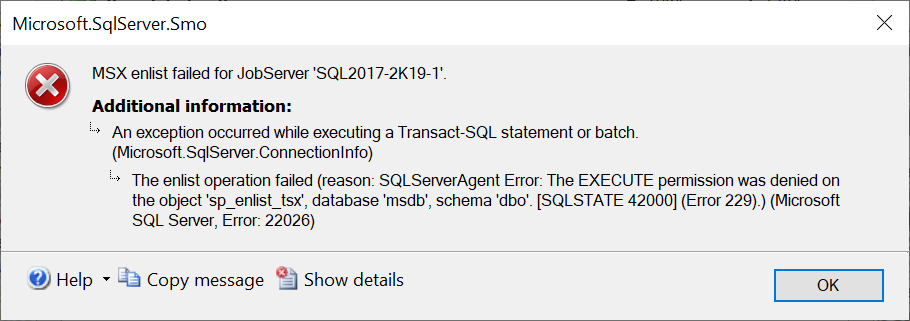
The EXECUTE permission was denied on the object 'sp_enlist_tsx', database 'msdb', schema 'dbo' (Error 229)

Image
This post describes how to fix the error: MSX enlist failed for JobServer An exception occurred while executing a Transact-SQL statement or batch. The enlist operation failed (reason: SQLServerAgent Error: The EXECUTE permission was denied on the object 'sp_enlist_tsx', database 'msdb', schema 'dbo'. [SQLSTATE 42000] (Error 229).) (Microsoft SQL Server, Error: 22026) Cause This error can occur when the target server machine account does not have sufficient privileges on the master server. Resolution Check the server roles of the target server machine account on the master server. On my test environment, I resolved the issue by assigning the account the sysadmin server role: Related Posts The enlist operation failed (SQLServerAgent: Unable to connect to MSX) (Error: 22026) The target server cannot establish an encrypted connection to the master server

The target server cannot establish an encrypted connection to the master server (Error: 22026)

Image
This post describes how to fix the error: MSX enlist failed for JobServer. An exception occurred while executing a Transact-SQL statement or batch. The enlist operation failed (reason: SQLServerAgentError: The target server cannot establish an encrypted connection to the master server) (Microsoft SQL Server, Error: 22026) Cause This error can occur if the MsxEncrypyChannelOptions registry subkey is not set correctly on the target server. Resolution Go to the registry on the target server and modify the value of the registry subkey. The possible values are defined here: https://docs.microsoft.com/en-us/sql/ssms/agent/set-encryption-options-on-target-servers?view=sql-server-ver15 For my test environment, I set it to 0, which disables the encryption. Related Posts The enlist operation failed (SQLServerAgent: Unable to connect to MSX) (Error: 22026) The EXECUTE permission was denied on the object 'sp_enlist_tsx', database 'msdb',...

The enlist operation failed (SQLServerAgent: Unable to connect to MSX) (Error: 22026)

Image
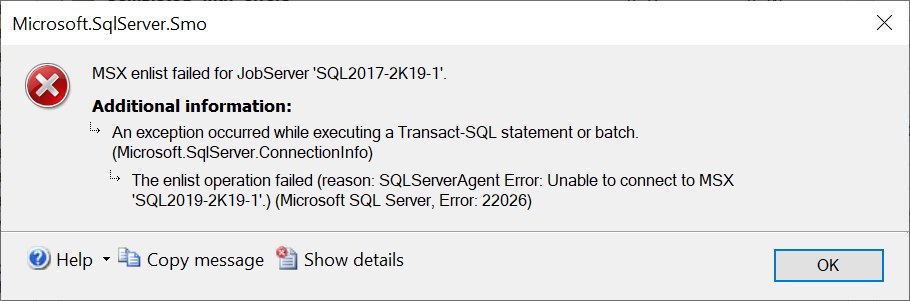
This post describes how to fix the error: MSX enlist failed for JobServer. An exception occurred while executing a Transact-SQL statement or batch. The enlist operation failed (reason SQLServerAgent Error: Unable to connect to MSX.) (Microsoft SQL Server, Error: 22026) Cause This error can occur when setting up Multi Server Administration > Make this a Master...  Check the log file on the master server (by default located here: C:\Program Files\Microsoft SQL Server\MSSQL15.MSSQLSERVER\MSSQL\Log) 2020-07-21 11:59:19.82 Logon       Login failed for user 'TEST2019\SQL2017-2K19-1$'. Reason: Could not find a login matching the name provided. [CLIENT: 192.168.131.227] The target server machine account (in this case 'TEST2019\SQL2017-2K19-1$') does not have permission to login on the master server. Resolution This error can be resolved by adding the target server machine account as a log...

Database cannot be opened. It is in the middle of a restore. (Error 927)

Image
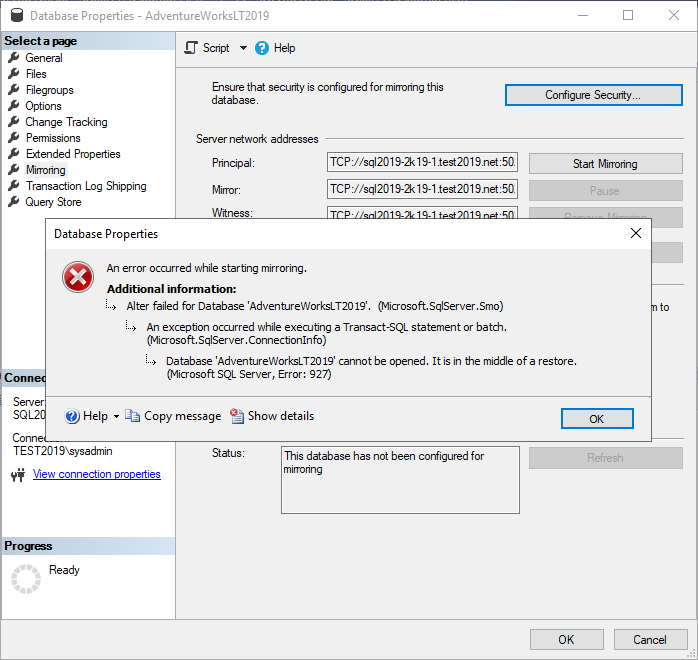
This post describes how to fix the error: Database cannot be opened. It is in the middle of a restore. (Microsoft SQL Server, Error: 927) Cause This error can occur when you try to configure mirroring using the Configure Database Mirroring Security Wizard. The endpoints are created successfully: However, when you try to Start Mirroring: The error occurs. Resolution To resolve the error, I had to start mirroring in SQL directly. I set the partner to the Principal network address on the mirror SQL instance: ALTER DATABASE AdventureWorksLT2019  SET PARTNER = 'TCP://SQL2019-2K19-1.test2019.net:5022' I then set the partner to the Mirror network address on the principal SQL instance: ALTER DATABASE   AdventureWorksLT2019   SET PARTNER = 'TCP://SQL2019-2K19-1.test2019.net:5023' And set the witness to the Witness network address on the principal SQL instance: ALTER DATABASE   AdventureWorksLT2...

The server network address can not be reached or does not exist. (Microsoft SQL Server, Error: 1418)

Image
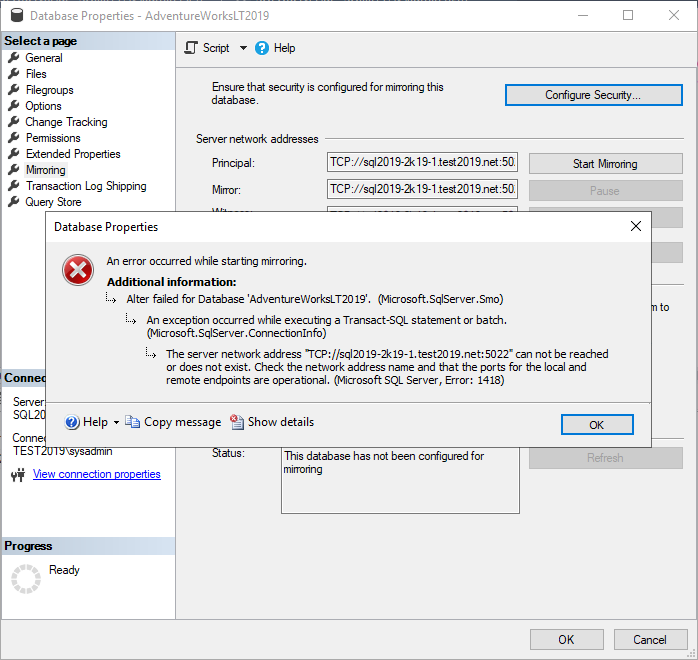
This post describes how to fix the error: An error occurred while starting mirroring. The server network address can not be reached or does not exist. (Microsoft SQL Server, Error: 1418) Cause This error appears to be related to network connectivity however the cause in this case was that I had entered incorrect accounts in the Service Accounts step of the Configure Database Mirroring Security Wizard. I verified this by checking the SQL ERRORLOG (by default located here: C:\Program Files\Microsoft SQL Server\MSSQL15.MSSQLSERVER\MSSQL\Log).  This contained the following: 2020-07-03 10:39:31.76 Logon       Database Mirroring login attempt by user 'TEST2019\SQL2019-2K19-1$.' failed with error: 'Connection handshake failed. The login 'NT Service\MSSQL$MIRRORINSTANCE' does not have CONNECT permission on the endpoint. State 84.'. Resolution To resolve the issue, first delete the previously created endpo...

Database is not configured for database mirroring. (Microsoft SQL Server, Error: 1416)

Image
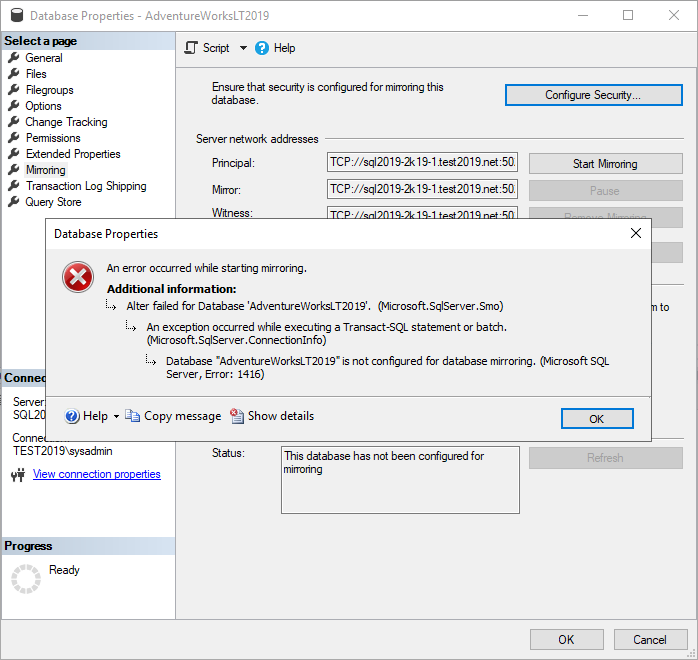
This post describes how to fix the error: An error occurred while starting mirroring. Database is not configured for database mirroring. (Microsoft SQL Server, Error: 1416) Cause This error can occur if RESTORE WITH NORECOVERY was not used when restoring either the database or the transaction log on the mirror SQL instance. Resolution When you restore the database, ensure RESTORE WITH NORECOVERY is selected: When you restore the transaction log, ensure RESTORE WITH NORECOVERY is selected: The database on the instance you want to mirror with should be in a (Restoring...) state: Related Posts - The client and server cannot communicate, because they do not possess a common algorithm -  Database cannot be opened. It is in the middle of a restore. (Error 927) -  Cannot alter the role 'db_owner', because it does not exist or you do not have permission. - The client and server cannot communicate, because they do not possess a common algorithm...

Database might contain bulk logged changes that have not been backed up (Microsoft SQL Server, Error: 1475)

Image
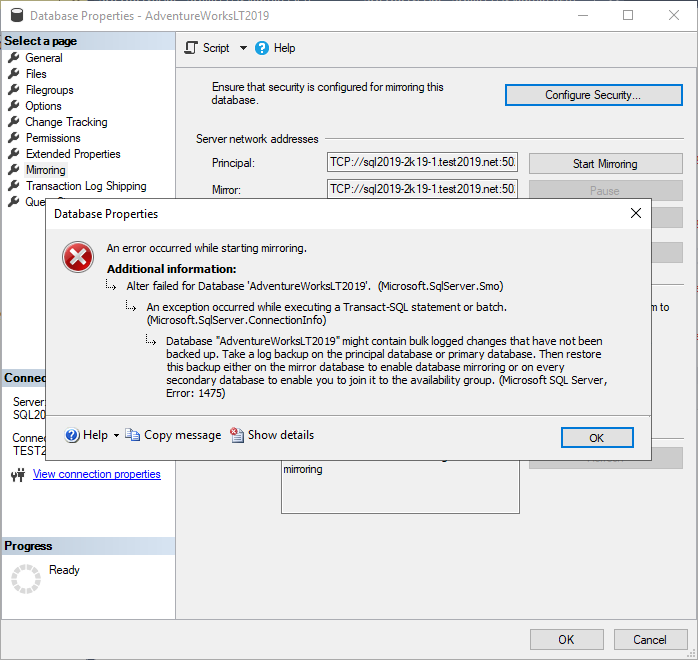
This post describes how to fix the error: An error occurred whilst starting mirroring. Database might contain bulk logged changes that have not been backed up. Take a log backup on the principal database or primary database. (Microsoft SQL Server, Error: 1475) Cause This error can occur when you attempt to start mirroring but the database you are trying to mirror from (the principal database) has not had a Transaction Log backup. Resolution On the database that you wish to mirror (the principal database), perform a Transaction Log backup: Then restore this backup on the mirror database, ensuring you use  RESTORE WITH NORECOVERY.  Failure to do this will result in the error: Database is not configured for database mirroring. (Microsoft SQL Server, Error: 1416)

VMware Workstation unrecoverable error: (vmui) Exception 0xc0000005 (access violation)

Image
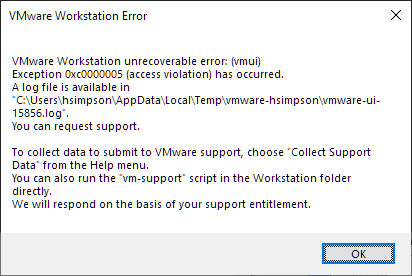
This post describes how to fix: VMware Workstation unrecoverable error: (vmui) Exception 0xc0000005 (access violation) has occurred. Cause Consulting the log file mentioned, the following can be seen: 2020-06-29T15:09:33.277+01:00| vmui| W115: "vmlist464" entries in the file "C:\Users\hsimpson\AppData\Roaming\VMware\inventory.vmls" are invalid. Somehow, entries in the inventory.vmls file have become invalid.  This has occurred to me a few times so it's a sensible idea to back this file up whenever you make significant changes to your VMware Workstation inventory. Resolution Either: Restore %AppData%\Roaming\VMware\inventory.vmls from a backup. - or - Delete %AppData%\Roaming\VMware\inventory.vmls and open VMware Workstation to create a new file.  This means you will need to recreate your folder hierarchy and add your virtual machines by opening their .vmx files. VMware Workstation should now open successfully. Related Posts - This PC can't run Windows...

Desktop Application Launcher

Image
A new version of CENTREL Solutions' desktop application launcher XIA Links 4.0 was released earlier this month. This software can be used to centrally manage desktop shortcuts across your organization. Version 4.0 includes the following new features: Modern User Interface A new user interface with different views to either show large icons, medium icons, tiles or shortcut details. XIA Links user interface Shortcut Usage The shortcut details view shows how many times each shortcut has been opened. Security Inheritance The security model has been improved; shortcuts and sections can now inherit security settings. Search A search feature has been added so users can quickly find shortcuts. Find out more about XIA Links Download a free 30-day trial

Force subtitles to default to on per YouTube video

Image
This post describes how to force subtitles to default to on per YouTube video, either when viewed directly on YouTube, or when the video is embedded. Video viewed directly on YouTube To force subtitles to default to on for a video viewed directly on YouTube, edit the video, go to Video details, then add the tag "yt:cc=on" and press Save. Subtitles will default to on the next time anyone views the video directly on YouTube. Embedded YouTube Video To force subtitles to default to on for an embedded YouTube video, add the following URL parameter to the src attribute in the embed code "?cc_load_policy=1" Related Posts - Embed YouTube video with iFrame without fixed height and width - Remove unavailable videos are hidden in YouTube playlist -  Add YouTube ...

Windows 10 Start Menu Search No Results & Blank

Image
If you're using the Windows 10 start menu search and it's not showing any results, just a blank screen, read on for the fix. Cause Apparently, this issue started happening today (5th February 20202) and is caused by the integration of Bing search into Windows search. Fix start menu search shows no results and is blank This is more of a workaround until Microsoft fix the issue. Essentially you need to disable the Bing search integration.  This can be done in the registry.  Navigate to: HKEY_CURRENT_USER\Software\Microsoft\Windows\CurrentVersion\Search Then create a new DWORD (32-bit) Value, call it  BingSearchEnabled  and give it a value of 0. Then use Task Manager to restart Windows Explorer. The Windows 10 start menu search will now work again.

ASP.NET Button ValidationGroup OnClientClick Not Working

This post describes how to fix OnClientClick validation on an ASP.NET page. Problem You've added OnClientClick to a button which contains Page_ClientValidate: OnClientClick ="Page_ClientValidate(''); if (!Page_IsValid) return false; return confirm('Are you sure?');" But it is not working when you press the button. Cause This can be caused because there are multiple validation groups on the page. Resolution To resolve the issue, specify the ValidationGroup in the Page_ClientValidate method: OnClientClick ="Page_ClientValidate(' validationGroup '); if (!Page_IsValid) return false; return confirm('Are you sure?');"

Excel Import CSV not using "Use First Row as Headers"

Image
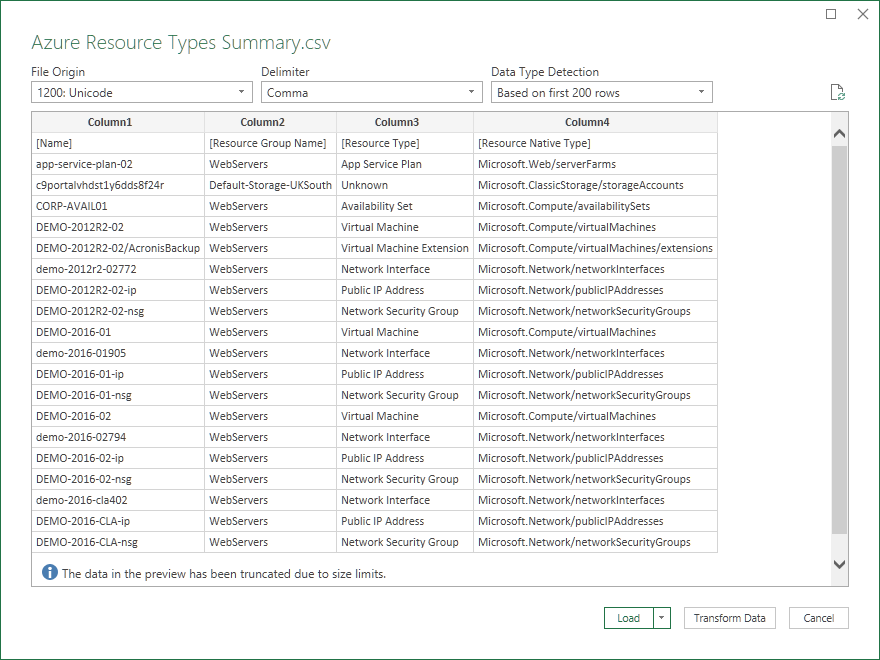
Issue When importing a CSV file into Microsoft Excel, you may find that it is not using "Use First Row as Headers" so you end up with Column1, Column2 etc as headers. Resolution To resolve this issue, press the Transform Data button in the bottom right. This loads the Power Query Editor which includes the "Use First Row as Headers" option in the Home ribbon.  Press this option once. Press Close & Load to apply. The first row is now being used as headers: Related Posts - Open a Microsoft Excel spreadsheet xlsx file as read only

VMware Reporting Tool & Auditing Software

Image
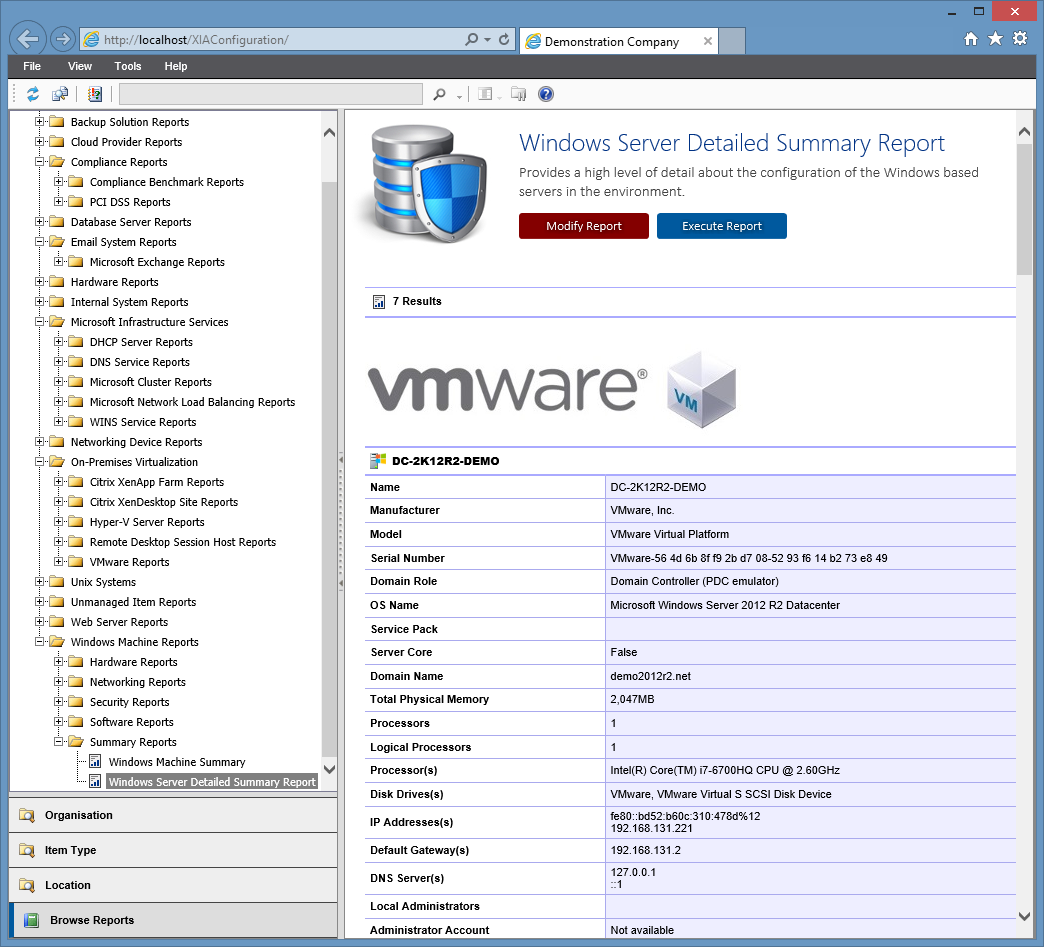
The VMware reporting tool XIA Configuration helps you keep track of VMware system settings across all your environments. Reports can be executed to retrieve data from hosts, virtual machines, hardware, network settings, security, and more. The following VMware reports are included with XIA Configuration: VMware Cluster Summary VMware Datastores Summary VMware Distributed Switch Summary VMware Host to Physical Host Item Mappings VMware Hosts Detailed Summary VMware Hosts Firewall Rules Summary VMware Hosts NTP Settings Summary VMware Hosts Security Summary VMware Hosts Service Summary VMware Hosts Summary VMware Security Roles VMware Virtual Machine Detailed Summary VMware Virtual Machine Hard Drive Summary VMware Virtual Machine Hardware Summary VMware Virtual Machine Network Adapter Summary VMware Virtual Machine Summary Reports can also be customised to meet your specific requirements by modifying the SQL code directly. Download Free 30-Day Trial ...

VMware Environment Documentation Example

Image
In my previous post, I discussed using XIA Configuration to automatically generate server documentation which can be used as a template or as an example to help get you started when tasked with documenting your Windows servers. The same can be done for VMware systems on your vSphere and vCenter environments to produce a VMware documentation template or example . Below is an example output: Download Free 30-Day Trial > Learn more >

Windows Server Documentation Example

Image
If you've been tasked with documenting your Windows servers, instead of starting from scratch, you can use a server documentation template or example to get you started. The server documentation tool XIA Configuration includes the capability to automatically generate PDF documents for your Windows machines which can be used as a template. Below is an example output: Download Free 30-Day Trial > Learn more >

Windows Server Reporting Tool & Auditing Software

Image
The Windows server reporting tool XIA Configuration helps you keep track of Windows machine settings across all your environments. Reports can be run against software, hardware, networking and security allowing you to check all aspects of both your Windows server and workstation configuration. XIA Configuration also includes built-in compliance reports so you can check your servers follow best practices and security standards. The following Windows reports are included with XIA Configuration: Windows Machine Reports .NET Framework Detailed Summary .NET Framework Summary All Windows Desktops All Windows Laptops Documented File Detailed Summary Documented File Summary Environment Variables Internet Explorer Report Local Administrator Accounts Local Administrators Group Membership Local Group Membership Report Management Controller Report Manufacturer Breakdown Model Breakdown Operating System Report (Windows Machine) Scheduled Task Summary Report Serve...

Microsoft Outlook 2019 Remove Mention Column Everywhere

Image
This post describes how to remove the Mention column that has been added in Microsoft Outlook 2019 from every folder. Firstly, go to a folder such as your Inbox and drag the Mention column off the column header until a cross appears then drop to delete the column. Next, go to the View tab then Change View then Apply Current View to Other Mail Folders... From here, select Apply view to subfolders to apply this view everywhere and remove the Mention column globally. Related Posts - Padding not showing on HTML buttons in emails in Outlook -  Find the folder where an email is located within in Microsoft Outlook

What's new in XIA Configuration 11

Image
Version 11 of the network documentation tool XIA Configuration has been released and includes the following new features: Windows Server 2019 Windows Server 2019 is now officially supported and can be scanned and documented. Learn more > Exchange Server 2019 Exchange Server 2019 is also now officially supported. Learn more > Report Scheduling A new scheduling feature has been added which allows the execution of both reports and report binders to be scheduled.  The output can be targeted at the file system or via email allowing, for example, summary reports to be emailed to system administrators on a weekly basis. Learn more > Scan Scheduling Scans performed by the XIA Configuration Client can now be scheduled to run once, daily, weekly or monthly. Active Directory Additional Active Directory attributes can now be scanned for users, groups and computers. Learn more > SMTP The SMTP settings have been updated to allow the use of...