Posts

Automatically document your Azure tenants with XIA Configuration

Image
CENTREL Solutions has recently released a new version of their automated IT documentation tool XIA Configuration. Version 14.0 of XIA Configuration includes the following new functionality: A completely rewritten Azure agent for scanning and documenting Microsoft Azure Support for vSphere 7.0 when scanning and documenting VMware vCenter and ESXi New reports including a  Windows Machine Microsoft Defender Summary and a Windows Machine Time Zones Summary to help you perform a Windows server security audit A revamped XIA Configuration Client user interface with a more modern look and feel You can try all this functionality for free by requesting a free XIA Configuration trial >

VMware vSphere Delete Evaluation License

Image
In this post, I describe how to delete the Evaluation License from VMware vSphere when you have added a Production License but you are still seeing the warning message "There are expired or expiring licenses in your inventory.": Cause The Evaluation License remains and can't be manually deleted, even if you've added a Production License, if the Evaluation License is still assigned to an asset. Resolution Check if your Production License is assigned: If it is not assigned, go to the Assets tab, select your Production License, then press ASSIGN LICENSE : Change the license assignment from the Evaluation License to your Production License: Go back to the Licenses tab, the Evaluation License is automatically removed and the warning message disappears after refreshing the page: Related Posts -  VMware vCenter Install Select Datastore Insufficient Disk Space - VMware ESXi Change Password Policy

VMware ESXi Change Password Policy

Image
In this post, I describe how you can change the VMware ESXi password policy. By default, a password with three different character classes is required.  I wanted to weaken this as I'm in a test environment and I want everything to have a simple password.  This post also describes how you can strengthen the password policy. Resolution To change the ESXi password policy: 1. Login to the ESXi administration user interface in the web browser. 2. Press Manage under Host 3. Search for Security.PasswordQualityControl  in Advanced settings 4. Edit the option to the value required (this article explains the syntax  https://linux.die.net/man/8/pam_passwdqc ) On my test environment, I changed mine to  min=7,7,7,7,7 which allows a weak password. This article contains more information on how you can enforce stronger passwords or use pass phrases:  https://docs.vmware.com/en/VMware-vSphere/7.0/com.vmware.vsphere.security.doc/GUID-DC96FFDB-F5F2-43EC-8C73-05ACDAE6BE43.ht...

VMware vCenter Install Select Datastore Insufficient Disk Space

Image
In this post, I describe how to fix the error "Insufficient disk space. Minimum required: 25GB" which can occur when installing vCenter Server and selecting the datastore: Cause This error occurred for me when I tried to install vCenter Server on an ESXi host which I had created in VMware Workstation version 16.2.2 using the default disk size of 142GB. Despite seeming to be enough space for a tiny test install, this actually only leaves 14GB free for the datastore due to the 120GB taken up by VMFSL (ESXi System Partition): Resolution There are two ways to resolve this issue.  Either increase the size of the datastore or reinstall ESXi with a smaller VMFSL partition. Resolution 1: Increase Datastore Size To increase the datastore size, simply add another disk to the ESXi server, then increase datastore capacity through the ESX management UI (accessible through a web browser using the IP address of the ESXi host). Resolution 2: Install ESXi with a smaller VMFSL partition This V...

Automate your user provisioning with XIA Automation

Image
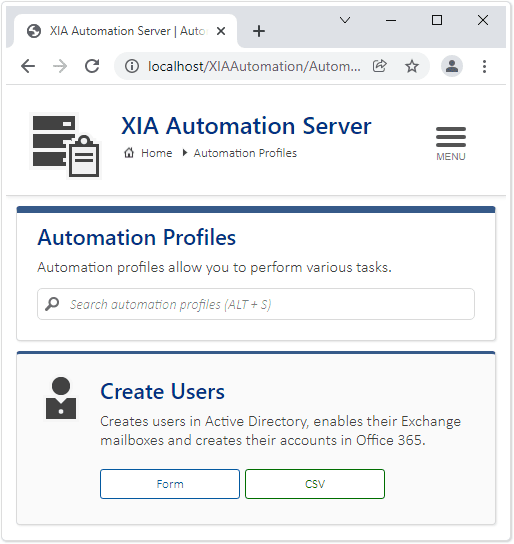
Earlier this month, CENTREL Solutions released XIA Automation v5, a new version of their user provisioning tool which helps organizations automate their common network tasks. The software allows you to automatically provision users into Active Directory, Exchange, Office 365 and Google. In this release, the following new functionality has been added: Responsive Web Interface A new and improved web interface: New Administration Interface A new, modernized administration interface: Windows Server 2022 Support for Windows Server 2022. You can try it for free by requesting a free trial .

The user's account has expired - Microsoft Windows - Workgroup

Image
This post describes how to resolve the error "The user's account has expired" on a Microsoft Windows Workgroup machine i.e. without Active Directory Users and Computers. Cause This error can occur when the local user account's expiry date is in the past and you try to logon as that user. Resolution You can't use Local Users and Groups to change the user account expiry date. The expiry date can be be changed using either Powershell or VBScript. PowerShell method To get the current expiry date, run the following command in PowerShell, replacing accountname with the account you want to get. Get-LocalUser accountname|SELECT * To set the expiry date to a specified date: Set-LocalUser asmith -AccountExpires (Get-Date).AddDays(12) To set the expiry date to never expire: Set-LocalUser accountname -AccountNeverExpires VBScript method The following VBScript gets the current expiry date: Set objUser = GetObject("WinNT://hostname/accountname") Wscript.Echo objUser....

Embed YouTube video with iFrame without fixed size height and width

Image
In this post, I describe how you can embed a YouTube video in HTML without using a fixed size height and width. Problem The problem with a fixed height and width is that the embedded YouTube video doesn't fit once the screen gets narrower than the fixed width (for example, on a mobile device) and you end up with the sides of the video being cut off and horizontal scrollbars: Resolution Thanks to CSS tricks for this post which has an excellent solution: 1. Create a container (e.g. a div) and put the embed video code from YouTube inside this container: < div class ="video-container">      < iframe src ="https://www.youtube.com/embed/HF7GTGaJdVg"></ iframe > </ div > 2. Specify the CSS for the container and the iFrame inside it: .video-container {     position : relative ;     padding-bottom : 56.63% ;     height : 0 ; }     ...

Padding not working on HTML button style in Outlook emails

Image
In this post, I describe a way to put padding on HTML buttons in emails when displayed in Microsoft Outlook. Outlook padding not working To add a button in HTML to an email, normally you’d just use an a tag with some padding and a background-color, etc: < a href =" https://howardsimpson.blogspot.com " style =" background-color : #4f7c1f ; color : #ffffff ; text-align : center ; text-decoration : none ; padding : 14px 20px 14px 20px ; " > View Blog </ a > Unfortunately, Microsoft Outlook ignores the padding and displays the button without it: Resolution To resolve this issue, you can use a filled rectangle in a table cell to create the padding around the text in the button in Outlook. The filled rectangle only works in Outlook, so it needs to be put in an Outlook conditional comment ( if mso ).  The a tag is included in the table cell but outside the Outlook conditional comment so that the button is shown in other email platforms. Here is the code...

Remove unavailable videos are hidden in YouTube playlist

Image
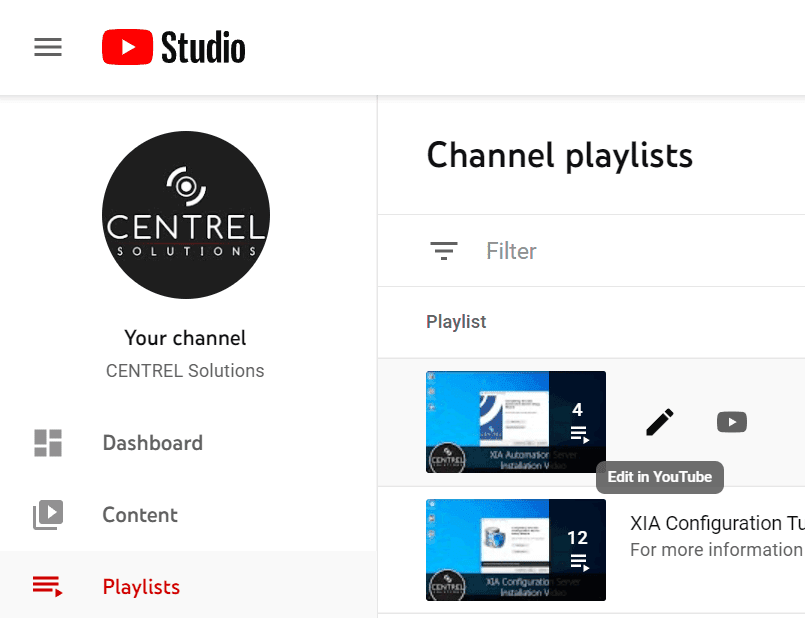
This post describes how you can remove the 'unavailable videos are hidden' message in a YouTube playlist by removing the unavailable videos from the playlist. Cause This issue can occur when you delete videos in a playlist before removing them from that playlist. Resolution To remove unavailable videos that are hidden from your playlist: 1. Go to YouTube Studio , select Playlists then press the pencil button for the playlist with the unavailable videos 2. Press the three dots button then select Show unavailable videos 3. Hover the mouse over the video you want to remove, press the three vertical dots button which appears, then select Remove from... 4. The deleted video is removed from the playlist and, once all deleted videos have been removed, the 'unavailable videos are hidden' message no longer appears. Related Posts - Embed YouTube video with iFrame without fixed height and width - Force subtitles to default to on per YouTube video - Add YouTube playlist link be...

Create 7zip checksum in Windows

Image
In this post, I describe a quick way to create a checksum in Windows using the free GUI tool 7-Zip. Checksums can be used to verify the integrity of files.  It can be useful to generate them when you are sharing files with others so they can check the file they receive hasn't been tampered with or corrupted. Resolution To create a checksum in Windows: 1. Download and install the free tool 7-zip EDIT: 2. In 7-Zip v24, right click the file you want to generate a checksum for, go to 7-Zip then  CRC SHA  then  * (In earlier versions of 7-Zip, go directly to  CRC SHA then  * ) 3. After a short time, the checksum is generated: 4. You can shift select all the rows and press CTRL-C to copy the information. This post has been edited.  Thanks to the comment below for pointing out the difference in the context menu in the newer versions of 7-Zip. Related Posts - Bulk rename Windows files with touch-friendly PowerRename

Windows cannot delete object LDAP://... because: A referral was returned from the server.

Image
This post describes how to fix the error: Windows cannot delete object LDAP://... because: A referral was returned from the server. Cause This error occurred when I was trying to delete a domain controller using Active Directory Sites and Services.  The domain controller was part of a child domain which I had demoted. Resolution I force deleted the server using ADSIEdit: 1. Open  ADSI Edit . 2. Right click the  ADSI Edit  root node in the tree view on the left then select  Connect to... 3. In  Connection Settings , change the  Naming Context  to  Configuration  then press  OK 4. Navigate down to  CN=Servers  then right click the server you want to delete and select  Delete Related Posts - The time between replications with this source has exceeded the tombstone lifetime - The operation failed because spn value provided for addition/modification is not unique forest-wide - Error 0x2015(The directory service can pe...

Error 0x2015(The directory service can perform the requested operation only on a leaf object.)

Image
This post describes how to fix the error: “DsRemoveDsDomainW error 0x2015(The directory service can perform the requested operation only on a leaf object.)” and “ldap_delete_ext_sW error 0x42(66 (Not allowed on Non-leaf). Ldap extended error message is 00002015: UpdErr: DSID-03100E01, problem 6003 (CANT_ON_NON_LEAF), data 0 Win32 error returned is 0x2015(The directory service can perform the requested operation only on a leaf object.))” Cause There errors can occur when you use ntdsutil metadata cleanup or partition management and you try to delete domains or partitions that are not leaf objects i.e. objects that have children. They occurred for me when I was trying to delete a child domain before deleting domaindnszones. Resolution To resolve this issue, delete the child objects that are children, before attempting to delete their parents. 1. Run ntdsutil 2. Enter  partition management 3. Enter connections 4. Enter connect to server %ServerName%  (replace with your DC serve...

The operation failed because spn value provided for addition/modification is not unique forest-wide

Image
This post describes how to fix the error: The operation failed because spn value provided for addition/modification is not unique forest-wide Cause This error occurred when I demoted a child Active Directory domain controller then tried to rejoin the parent domain.  I think the parent domain still had some record of the SPN which I was not able to delete.  By default, Windows checks to ensure the SPN is unique. Resolution To resolve this issue, I disabled the uniqueness check as follows: 1. Open  ADSI Edit . 2. Right click the  ADSI Edit  root node in the tree view on the left then select  Connect to... 3. In  Connection Settings , change the  Naming Context  to  Configuration  then press  OK 4. Navigate down to  CN=Windows NT  then right click  CN=Directory Service  and select  Properties 5. Double click dSHeuristics and change the value to  000000000100000000023 to disable the UPN and SPN uniquen...

The time between replications with this source has exceeded the tombstone lifetime

Image
This post describes how to fix the error: "The directory service cannot replicate with this server because the time since the last replication with this server has exceeded the tombstone lifetime." and "It has been too long since this machine last replicated with the named source machine. The time between replications with this source has exceeded the tombstone lifetime. Replication has been stopped with this source." Cause This error can occur when trying to replicate configuration to or from the selected DC in Active Directory Sites and Services when replication has not occurred for more days than is specified in the tombstone lifetime. This error can also be seen when running DCDIAG /v /q /a from a Command Prompt. Resolution Increase Tombstone Lifetime If you are using a test environment, you may not care if replication has not occurred for a long time, so you can resolve this issue by increasing the tombstone lifetime. To do this: 1. Open ADSI Edit . 2. Right cl...

You cannot delete a sheet with a linked form. Please unlink the form first.

Image
This post describes how to fix the error: There was a problem You cannot delete a sheet with a linked form. Please unlink the form first. Cause This can occur if you have created a new form which is automatically linked to the sheet. I did this accidentally when I was trying to go to Data -> Sort Sheet. Resolution To resolve the issue, go to Tools -> Manage form -> Unlink form: You should now be able to successfully delete the form: Related Posts -  Insert multiple rows above or below in a Google Sheet

WARNING: MSG:UnableToDownload LinkID 627338 clcid 0x409

Image
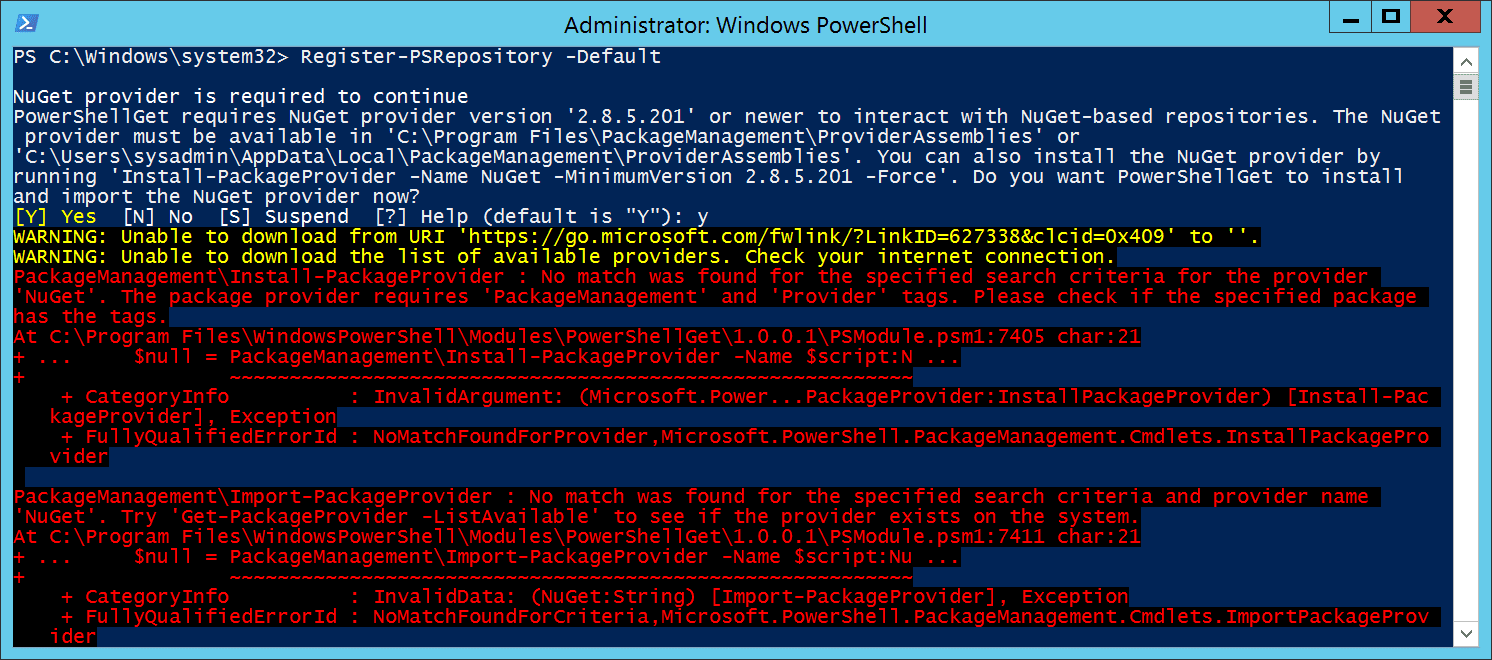
This post describes how to resolve: WARNING: MSG:UnableToDownload «https://go.microsoft.com/fwlink/?LinkID=627338&clcid=0x409» «» Cause This warning can occur when trying to get a PowerShell repository and Tls12 is not specified as the SecurityProtocol. Resolution To resolve this issue, set the SecurityProtocol to Tls12 by running this command in PowerShell: [Net.ServicePointManager]::SecurityProtocol = [Net.SecurityProtocolType]::Tls12 You should then be able to get repositories and install PowerShell modules successfully. Related Posts -  Unable to find package provider 'NuGet'. It may not be imported yet. Try 'Get-PackageProvider -ListAvailable'.

Unable to find package provider 'NuGet'. It may not be imported yet. Try 'Get-PackageProvider -ListAvailable'.

Image
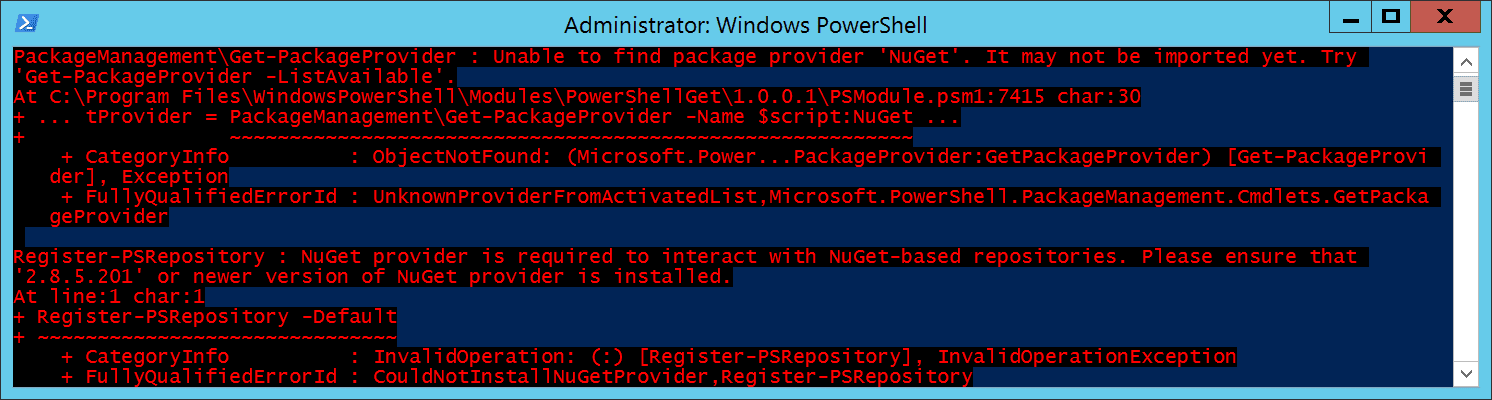
This post describes how to fix the error: PackageManagement\Get-PackageProvider : Unable to find package provider 'NuGet'. It may not be imported yet. Try  'Get-PackageProvider -ListAvailable'. At C:\Program Files\WindowsPowerShell\Modules\PowerShellGet\1.0.0.1\PSModule.psm1:7415 char:30 + ... tProvider = PackageManagement\Get-PackageProvider -Name $script:NuGet ... +                 ~~~~~~~~~~~~~~~~~~~~~~~~~~~~~~~~~~~~~~~~~~~~~~~~~~~~~~~~~     + CategoryInfo          : ObjectNotFound: (Microsoft.Power...PackageProvider:GetPackageProvider) [Get-PackageProvi der], Exception     + FullyQualifiedErrorId : UnknownProviderFromActivatedList,Microsoft.PowerShell.PackageManagement.Cmdlets.GetPacka geProvider Install-Module : NuGet provider is required to interact with NuGet-based repositories. Please ensure that '2.8.5.201'  or newer version of NuGet provider is installed. At line:1 char:1 + Inst...

No match was found for the specified search criteria for the provider 'NuGet'

Image
This post describes how to fix the error: PackageManagement\Install-PackageProvider : No match was found for the specified search criteria for the provider  'NuGet'. The package provider requires 'PackageManagement' and 'Provider' tags. Please check if the specified package  has the tags. At C:\Program Files\WindowsPowerShell\Modules\PowerShellGet\1.0.0.1\PSModule.psm1:7405 char:21 + ...     $null = PackageManagement\Install-PackageProvider -Name $script:N ... +                 ~~~~~~~~~~~~~~~~~~~~~~~~~~~~~~~~~~~~~~~~~~~~~~~~~~~~~~~~~     + CategoryInfo          : InvalidArgument: (Microsoft.Power...PackageProvider:InstallPackageProvider) [Install-Pac kageProvider], Exception     + FullyQualifiedErrorId : NoMatchFoundForProvider,Microsoft.PowerShell.PackageManagement.Cmdlets.InstallPackagePro vider PackageManagement\Import-PackageProvider : No match was found for the specif...