Posts

Bulk import Users into Active Directory from CSV

Image
In this video, the Active Directory management tool XIA Automation is used to bulk import users into AD from a CSV file. The CSV import feature is one of the many benefits of using XIA Automation to help manage your network.  It can be combined with automation tasks to enable you to mass provision user accounts in minutes. - Please visit the XIA Automation page form more information. - A free trial version is available.

Install XIA Links Server v3

Image
If you need help installing XIA Links v3, check out the tutorial video posted on the CENTREL Solutions YouTube channel . It covers how to install the prerequisites including IIS, .NET 3.5 and ASP.NET 3.5. XIA Links Server is then installed.  The .NET CLR version is changed to v2.0.  The XIA Links Client is then downloaded and installed from the Server homepage. Finally, the Server URL is configured in the Client and the licence file is applied. - Please visit the XIA Links page for more information. - A free trial version is available.

Install XIA Automation Server v3

Image
Fresh off the back of our XIA Configuration Server installation video , we've created a XIA Automation Server v3 installation video . It covers how to install all the prerequisites including IIS, .NET 3.5 and ASP.NET 3.5 and walks you through the installation steps. The purpose of the client and server is briefly mentioned at the end.  Note: This is covered in more detail in our getting started video . - Please visit the XIA Automation page for more information. - A free trial version is available.

Active Directory Management Tool

Image
In the latest of our series of tutorials , I demonstrate how to get started with the Active Directory Management Tool XIA Automation Server. The video starts by showing how to create automation profiles and tasks in the XIA Automation Client.  A sample configuration is downloaded from the CENTREL Solutions website and imported.  The tasks are then executed through the XIA Automation Server web interface via both the form input and CSV input. The video ends by mentioning a couple of other features commonly used in the software, Active Directory password resets and custom branding. - Please visit the XIA Automation page form more information. - A free trial version is available.

Install XIA Configuration Server v9.0

Image
We recently updated our XIA Configuration Server v9.0 installation video.  It now covers how to install all the prerequisites including Microsoft .NET 3.5, IIS and SQL on Windows Server 2008 R2, Windows Server 2012 R2 and Windows Server 2016. It also explains options such as the 'Preconfigure the client service' checkbox. You can watch it here: How to install the IT Documentation Tool XIA Configuration - Please visit the XIA Configuration page for more information - A free trial version is available

Cannot alter the role 'db_owner', because it does not exist or you do not have permission.

Image
This post describes how to fix the error "Cannot alter the role 'db_owner', because it does not exist or you do not have permission". This also applies to the role 'db_datareader'. Cause This can occur if your server collation is case sensitive and you're trying to alter a role in SQL using the sp_addrolemember stored procedure e.g. EXEC sp_addrolemember 'db_Owner', 'dbo'; To check your server collation: SELECT SERVERPROPERTY('COLLATION'); To check your database collation: SELECT DATABASEPROPERTYEX('%DATABASENAME%', 'Collation') SQLCollation; Note: You can get a description of each COLLATION using this query: SELECT * FROM fn_helpcollations(); Solution Change your server collation or ensure the role you want to alter matches exactly including case. EXEC sp_addrolemember 'db_ o wner', 'dbo'; Video Watch the video:  Cannot alter the role, because it does not exi...

The type initializer for 'System.Management.Automation.Tracing.PSEtwLog' threw an exception.

Image
This post describes how to fix: The type initializer for 'System.Management.Automation.Tracing.PSEtwLog' threw an exception. Background I recently installed XIA Configuration on Windows Server 2008 and wanted to scan a Microsoft Azure tenant .  In order to do so, I first had to install the Azure PowerShell cmdlets.  This required WMF 5.0 which I downloaded and installed. Error I then tried to open PowerShell but it immediately closed.  When I tried to open PowerShell in a command prompt, I could see the error was 'The type initializer for 'System.Management.Automation.Tracing.PSEtwLog' threw an exception.' Fix After doing some research, I discovered I also needed to install .NET Framework 4.5.  PowerShell then opened successfully and I was able to install the Azure PowerShell cmdlets and run the scan. Video You can see this fix in the following video PowerShell does not open on Windows Server 2008 : Related Posts -  WARNING: Unable to ...

Document Microsoft Azure

Image
We've recently uploaded a new tutorial describing how to use XIA Configuration as an Azure documentation tool . The video describes how to scan an Azure tenant and view the data in XIA Configuration's web interface. - The PDF export feature is used to generate an Azure Tenant document with custom branding and reports  are used to query the entire environment. - The item comparison feature  allows you to compare the configuration of different Azure environments or different versions of the same environment. Download Free 30-day Trial > Learn more >

Document VMware virtual machines and distributed switches

Image
CENTREL Solutions released XIA Configuration v8.1 earlier this year and it has a number of improvements including richer detail retrieved from VMware systems . VMware virtual machine documentation generated by XIA Configuration now includes virtual hardware, permissions, templates, snapshots and more. The information retrieved from VMware hosts has more detail including network configuration, licensed features, security profiles and more. VMware distributed switches are now also fully documented with information on port groups and uplink ports. - Visit the VMware capability page  to find out more. - A free trial version is available.

Add a YouTube End Screen

Image
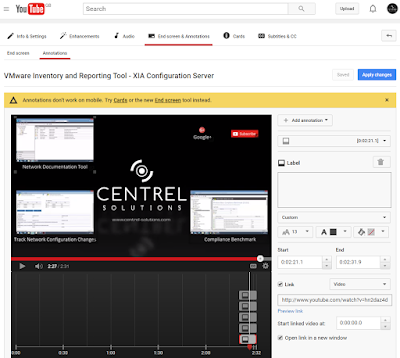
Over the last two months, I've been publishing YouTube videos to the CENTREL Solutions channel .  I'm also an avid watcher of YouTube videos and noticed that some videos had a snazzy end screen with clickable areas that took you to other videos or to allow you to subscribe to the channel. Knowing this was possible, I started to research how to add it to my videos.  I discovered the Annotations area in the Video Manager which allows you to add hotspots with links to videos, playlists, subscribe and more. I wasn't sure how to add the thumbnail screenshots but eventually figured out that you could embed them in the video itself then overlay the hotspots in the YouTube video manager later once it was uploaded. Add a YouTube End Screen In the last week or so, YouTube recently changed the annotations area.  It is now called "End screen & Annotations".  Also, as you can see in the screenshot above, if you go to annotations, you are now shown a warning that...

Read Advanced Audit Policy Configuration

Image
If you want to read advanced audit policy configuration, the most reliable way is not to trust any of the Group Policy reporting tools but instead to run the following command from an elevated command prompt: auditpol.exe /get /category:* Advanced audit policy configuration can also be viewed in the auditing tool XIA Configuration . How to read advanced audit policy configuration video

Server Inventory Software

Image
Today I want to talk about another tutorial video from CENTREL Solutions. This video goes into more detail, specifically around using the server inventory software  XIA Configuration to create an inventory of the servers and devices on a network. The video starts in the XIA Configuration Client and shows the scan tasks typically used to retrieve inventory data. It then shows the inventory data in the XIA Configuration Server and gives an overview of the detailed information that can be viewed for each item. Finally it demonstrates the reporting feature which is used to query the entire inventory. To see all the tutorial videos, visit the Tutorials page . Interested in XIA Configuration ? Request a free trial , view pricing or download now .

Network Documentation Tool

Image
CENTREL Solutions has recently been putting together some tutorial videos to explain how to use the network documentation tool XIA Configuration. The first video gives an overview of the XIA Configuration Client which scans a network to retrieve configuration data. It then shows the XIA Configuration Server which displays this configuration data in a web interface with several different views including by organisation, by type and by report. Reports allow you to query the data and extract just the information you need. To see all the tutorial videos, visit the Tutorials page . Interested in XIA Configuration? Find out more , request a free trial , view pricing or download now .

Document Local Administrator Password Solution (LAPS) Settings

Image
New functionality has recently been added to the server documentation software XIA Configuration which allows it document  Local Administrator Password Solution (LAPS) settings. This allows you to quickly and easily check policy settings such as password length and complexity type. The Local Administrator Password Solution increases security by allowing you to set different local administrator passwords on each computer on your Active Directory domain and to change them more often.  You can also retrieve the passwords straight from Active Directory. Find out more >

The attribute syntax specified to the directory service is invalid.

Image
This post describes how to fix the error: The attribute syntax specified to the directory service is invalid. Problem When committing the setting of an Active Directory custom attribute you get the error: System.DirectoryServices.DirectoryServicesCOMException (0x8007200B): The attribute syntax specified to the directory service is invalid. at System.DirectoryServices.DirectoryEntry.CommitChanges() Cause This error occurs when you try to set a custom attribute to a type that is invalid. For example, if you try to set an integer when the Active Directory schema is configured to accept a string. This can occur when you use XIA Automation to create or modify accounts with one or more custom attributes in Active Directory: XIA Automation screenshot showing the error The attribute syntax specified to the directory service is invalid Solution Ensure that the value type that you are trying to set matches what has been configured for that custom attribute in your Ac...

Audit and Document your Windows Services Settings

Image
If you want to automatically audit and  document your Windows Services settings then check out some of the latest functionality added to the IT documentation tool XIA Configuration Server.  Retrieve settings about each Windows service including dependencies and recovery information. The full list of Windows services settings documented include: Service Name Service Display Name Description Service Account Name Service Path Service Process ID Service Start Mode (including Delayed and Trigger starts) Allow Service to Interact with Desktop Service State Recovery Options First failure action Second failure action Subsequent failure action Reset failure count Service restart delay Enable actions for stops with errors Computer restart delay Failure command  Learn more >

Document Fine-Grained Password Policies

Image
The server documentation tool XIA Configuration has recently been updated to support documenting fine-grained password policies in an Active Directory domain. Auditing fine-grained password policy configuration can help you provide information aligned to PCI DSS requirement 8.2.4 and requirement 8.2.5. The following settings are documented: Name Precedence Description Minimum Password Length Password History Password Must Meet Complexity Requirements Store Password Using Reversible Encryption Minimum Password Age Maximum Password Age Last Updated Creation Date Account Lockout Policy Account Lockout Duration Reset Failed Logon Attempts After (minutes) Applies To (accounts) Learn more >

Document Advanced Security Audit Policy Settings

Image
If you want to document your Windows Advanced Security Policy settings, take a look at the server documentation tool XIA Configuration. It has recently been updated to include information about advanced audit policy configuration . The information is gathered remotely so you don't need to install any software on each of the machines you want to document. Information from the following categories is documented by XIA Configuration: Account Logon, Account Management, Detailed Tracking, DS Access, Logon/Logoff, Object Access, Policy Change, Privilege Use and System. If you're interested, find out more about XIA Configuration  or request a free trial .

Audit Citrix server configuration and automatically create documentation

Image
Use the  Citrix XenApp documentation tool  XIA Configuration to audit your Citrix Farms and create professional documentation. It automatically scans and documents your Citrix XenApp Farms, servers, hotfixes, load balancing policies, published applications and more. The following Citrix XenApp versions are supported: Citrix XenApp 6.0, Advanced Edition Citrix XenApp 6.0, Enterprise Edition Citrix XenApp 6.0, Platinum Edition Citrix XenApp 6.5, Advanced Edition Citrix XenApp 6.5, Enterprise Edition Citrix XenApp 6.5, Platinum Edition To view the output, take a look at the Citrix documentation  example PDF.

Name translation Could not find the name or insufficient right to see name

Image
This post describes how to fix the error: name translation could not find the name or insufficient right to see name (Error 0x80072116). Cause When calling the ActiveDs.NameTranslateClass.Set method, the following exception occurs if the Windows user account being used does not have permission to create or move the object to this path or if the LDAP path passed into the method is invalid:  System.ApplicationException: Could not convert the LDAP path ' LDAPPATH . Name translation: Could not find the name or insufficient right to see name . (Exception from HRESULT: 0x80072116) ---> System.Runtime.InteropServices.COMException (0x80072116): Name translation: Could not find the name or insufficient right to see name. (Exception from HRESULT: 0x80072116)   at ActiveDs.NameTranslateClass.Set(Int32 lnSetType, String bstrADsPath) XIA Automation screenshot showing error: Name translation: Could not find the name or insufficient right to see name (Exception 0x8...