Posts

Windows Server Security Audit Tool

Image
Perform a detailed security audit of your Windows servers and workstations with the  Windows server security audit tool  XIA Configuration. Version 4.2 includes: Improved documentation of local user accounts  Local Security Options  Local account lockout policies  Local password policies  Continued support for user rights assignment  This functionality can be used to: Define servers that do not meet the security requirements of the organisation  Detect changes to the security configuration of remote machines  Determine where a server's administrator account or administrators group has been renamed  Learn more >

XIA Configuration Server 4.2 released

Image
XIA Configuration Server is a  network documentation tool  which creates a detailed inventory of all the systems on your network. Version 4.2 is now available to download.  This release includes: Microsoft DHCP audit and documentation tool .  Scan your DHCP servers including the DHCP server itself as well as scopes, exclusions, classes and scopes. Unix and Linux server documentation tool .  Scan your Unix and Linux servers including Solaris and HPUX.  Locate incorrectly configured network settings and track changes to configuration files. Mobile support so you can view your configuration data when you're away from the office with either an iPhone or Android device. As well as the new features listed above, XIA Configuration Server can also be used as a SQL server documentation tool  and as an Active Directory documentation tool .

Document Remote Desktop Configuration

Image
If you want to document your  Remote Desktop configuration , you can do it automatically with the  network documentation tool  XIA Configuration. It includes both the remote desktop and remote assistance settings on Windows PCs and Windows Servers. This is important when documenting an environment as it effects the security of a network and the ability to support managed users. The following settings are documented: Allow Remote Control  Ticket Expiry  Ticket Encryption  License Mode  Full Terminal Server  Remote Desktop Users  Remote Assistance Enabled - Find out more about XIA Configuration > - Request a Free Trial >

Extend Configuration Types with a software tool called XIA Configuration

Image
XIA Configuration's CMDB extensibility with custom attributes design goal is to automatically obtain as much configuration information as possible. However, it is not always possible to obtain all the information desired programmatically, for example, Contact details, Security access details for a building or data room and ISP details including ISP name and connection type. XIA Configuration handles this by allowing users to extend any of the configuration types with custom sections and attributes. This custom information is seamlessly integrated with the existing user interface and PDF report exports. Information that can be input into these custom sections can be constrained with mandatory fields, drop down lists and regular expressions. Find out more about XIA Configuration

Document and Audit your Remote Desktop Session Hosts

Image
You can use a tool called XIA Configuration Server to document and audit your Terminal Server Configuration (Remote Desktop Session Host) including General Settings, Connections (Terminals), Connection Broker and RemoteApp configuration. Support is included for Windows Server 2003, Windows Server 2008 and Windows Server 2012. Examples of use include: Locating where RemoteApp applications are being hosted Locating which user accounts are permitted to connect to a Remote Desktop Host Ensuring that all Terminal Servers within a farm are configured identically - Find out more about XIA Configuration Server here:  IT Network Documentation Tool - A free trial version is available

XIA Links v1.9 released

Image
XIA Links v1.9 has been released this week. XIA Links is a desktop application launcher that empowers users to launch applications from a single location. This latest update allows users to improve the customisation of the user interface and provides ways to further lock it down: • Sections can now be nested within one another; • You can configure the size of the main screen at startup; • All "CENTREL Solutions" and "XIA" branding can now be replaced including the status bar text can now be customised to match the title bar; • Help and tools menus can now be disabled; • The "Show applications not found on this machine" can be disabled. Learn more >

iPhone Brightness and WiFi Shortcut

Image
This post describes a shortcut to quickly get to iPhone brightness and WiFi. The quickest way to get to brightness and WiFi on an iPhone is to simply swipe towards the centre of the screen from the top right hand corner.  This will show the following control centre menu which contains both a WiFi on/off toggle button and a brightness slider control:

Microsoft Exchange Documentation Tool

Image
XIA Configuration is a software tool which can be used as a  Microsoft Exchange documentation tool .  It documents Exchange 2010 and above, including Exchange Online.  Data contained within the documentation includes servers, storage groups, mailbox stores and address lists. You can easily detect changes to an Exchange server's networking settings or SMTP configuration, or expose incorrectly configured servers and discover security vulnerabilities. Download Free 30-Day Trial > Learn more >

SQL Server Inventory Tool

Image
If you need to create an inventory of your SQL instances then you should download and try the  SQL server inventory tool  XIA Configuration. The software audits and documents your SQL instances, databases, tables, stored procedures, security settings, connection settings and more. It can also track changes to your environment and allows you to compare versions so that you can see what has changed. This helps to expose security vulnerabilities or badly configured servers. Download Free 30-Day Trial > Learn more >

I'm back!

So, a couple of things changed and I decided I would continue to post to this blog.  Firstly, Blogger updated its interface, it's now much more inviting to use. Secondly, it clearly shows you how many visits you are getting and I can see that quite a few people are visiting this blog, thank you for doing so! I'm going to continue to use my Wordpress blog to post interesting things I find on the web and use this blog to talk about technical tasks and solving IT problems!

Wordpress or Blogger?

I've been experimenting with both blogger and wordpress over the last few days.  I've decided to use wordpress as my non-technical blog for things like photos and blogger as my technical blog for things like troubleshooting articles. My wordpress blog is here: Howard Simpson blog

Microsoft DNS Audit & Documentation Tool

Image
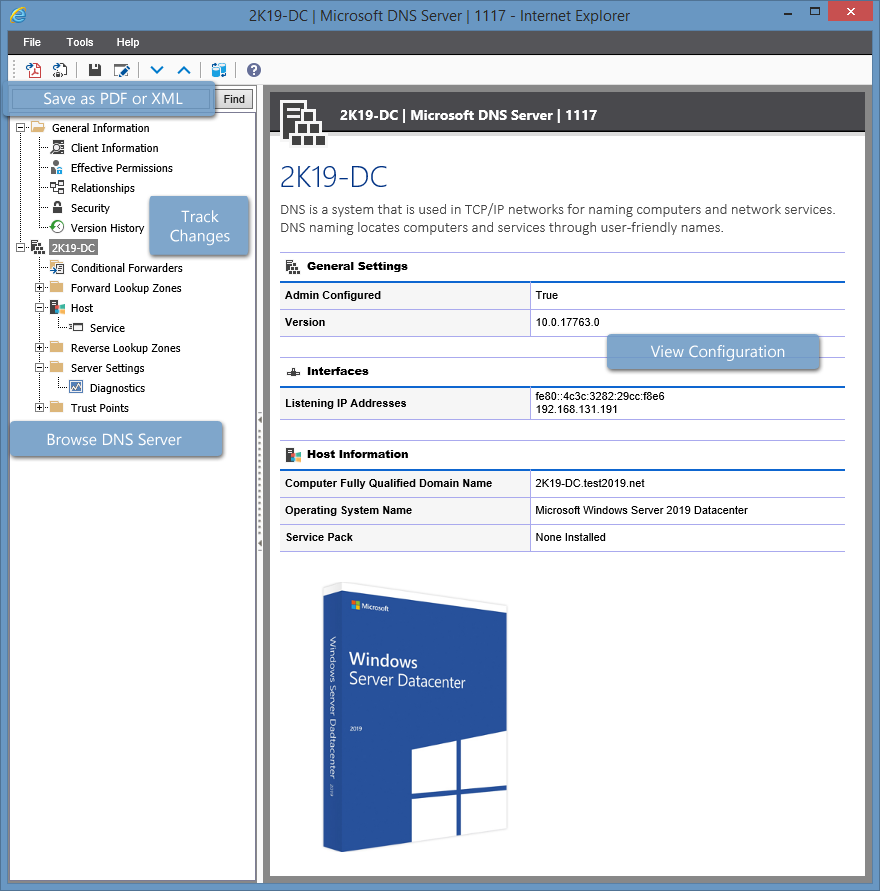
Use the  Microsoft DNS audit and documentation tool  XIA Configuration to audit and document your Microsoft DNS servers including information about conditional forwarders, host settings, forward and reverse lookup zones, server settings and trust points. Learn more about XIA Configuration > Download a free 30-day trial >

VMware Documentation Tool & Auditing Software

Image
Use the  VMware documentation tool  XIA Configuration to automatically document you vCenter, vSphere, and ESX configuration including virtual machines, hosts, distributed switches, resource pools, clusters, datastores and more. The software includes a change tracking feature which is a powerful way to monitor change within a virtual environment. It can detect changes to an ESX host or expose incorrectly configured virtual machines and security vulnerabilities. Download Free 30-Day Trial > Learn more >

IT Documentation Tool

Image
XIA Configuration is an IT documentation tool which documents and audits your IT infrastructure configuration. It automatically creates an inventory of all the systems on a network and saves you time and money by automating tasks that would take days to perform manually such as generating professional documentation, keeping track of changes, and running reports to query your environments. View this page to see some IT infrastructure documentation examples  generated using XIA Configuration's PDF output feature. XIA Configuration has a growing list of capabilities for many major technologies.  Find out more about recently added features by visiting the CENTREL Solutions news page .

IIS Documentation Tool & Auditing Software

Image
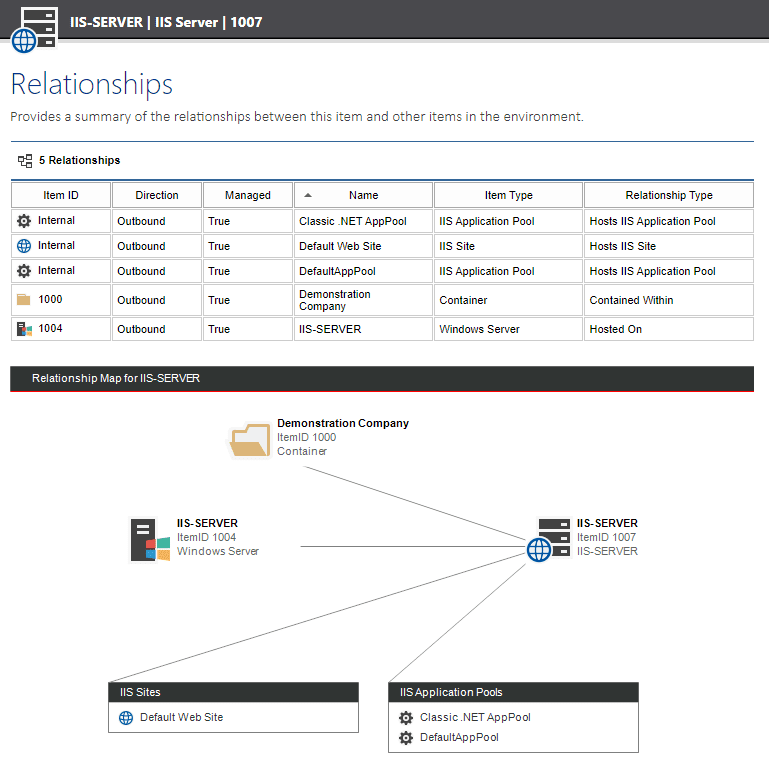
I've talked about XIA Configuration in a  previous post .  Today, I want to tell you that XIA Configuration can also be used as an  IIS documentation tool .  It can automatically document your IIS server configuration on Windows Server 2003 (IIS 6), Windows Server 2008 (IIS 7), Windows Server 2008 R2 (IIS 7.5) and above including your Web Sites, Application Pools and Applications configured within the IIS Server. The reporting feature allows you to audit the configuration of all your IIS servers at once. XIA Configuration can also be used to generate a relationship map such as this: Download Free 30-Day Trial > Learn more >

My first post - XIA Configuration Server

Image
Welcome to my blog.  In my first post I want to write a few words about some of the capabilities of a network documentation tool called XIA Configuration Server.  These are just some of the technologies that it can automatically document.  In the future, I will post about the other server roles that it supports. Please click the links for more info: Document Active Directory Automatically document multiple Microsoft Active Directory domains and Group Policy settings from a single server. Document SQL Server Automatically document your SQL Server instances, including detailed information about databases, tables and stored procedures. Document Microsoft Exchange Automatically audit your Exchange Organisation infrastructure from Exchange 2000 to 2013 including Exchange Servers, address lists, storage groups and mailbox stores. Download Free 30-Day Trial > Learn more >